Choosing wireless earbuds is harder than it should be, because the specifications that get printed on a box are rarely the ones that decide whether you enjoy them. Fit, seal and battery honesty matter far more than a headline number, and none of them are visible in a product photo. This guide explains what to look for, how to test a pair properly in the first week, how to keep them clean, and how to listen without damaging your hearing. It also covers the model WLD Store lists for shoppers in Saudi Arabia.
Why fit matters more than any wireless earbuds specification
Every serious review of wireless earbuds eventually reaches the same conclusion: if the seal is wrong, nothing else can rescue the sound. A poor seal lets bass escape, so the same pair that sounds full in one ear can sound thin and tinny in another.
The seal also determines how much outside noise reaches you. Passive isolation, which is simply the physical block created by a well-fitting tip, does a surprising amount of the work that people credit to electronics.
Comfort is the third consequence. A tip that is slightly too large produces pressure and aching after an hour, while one that is too small keeps working loose and gets pushed back in until the ear canal is irritated.
This is why the tip selection in the box matters. A set of wireless earbuds supplied with several tip sizes is far more likely to fit you than one with a single fixed size, and swapping tips is the cheapest upgrade available.
What wireless earbuds battery numbers actually mean
Battery claims in this category are quoted in two different ways, and confusing them causes most of the disappointment.
The first number is playtime from the buds alone: how long you can listen before putting them back in the case. The second, larger figure is total playtime, which adds all the recharges the case can provide before the case itself needs charging.
The WLD Store listing for the model below states up to 30-hour total playtime, which is the combined figure rather than the time in your ears. Reading it that way sets a realistic expectation for a working day.
Real-world results are also lower than laboratory figures. Higher volume, active noise cancelling and a weak connection all consume more power, and battery capacity falls gradually over the years in any device. Expect roughly a modest reduction from the quoted numbers in normal use.
What makes a good pair of wireless earbuds
Five characteristics separate a pair you use daily from a pair that lives in a drawer.
Tips, shape and secure fit
Look at how many tip sizes are supplied and whether the body of the bud sits flush or protrudes. Protruding designs catch on masks, scarves and pillows, while flush designs are harder to remove but stay put better.
If you plan to use wireless earbuds while exercising, weight and shape matter even more, since a heavy bud will gradually work its way loose no matter how good the tip is.
Noise cancelling and transparency
Active noise cancellation uses microphones to detect incoming sound and generates an opposing signal to reduce it. It works best on steady, low-frequency noise such as an aircraft cabin or air conditioning, and much less well on speech.
The listing describes this model as having active noise cancellation. Whatever the implementation, expect a large reduction in engine drone and a smaller reduction in a nearby conversation, because that is the nature of the technology rather than a limitation of one product.
Connection stability and latency
A stable connection matters more than an exotic codec. Test a new pair in a busy place, because crowded areas carry a lot of competing radio traffic and that is where dropouts appear.
Latency is the delay between picture and sound. It is irrelevant for music, noticeable when watching video, and important for gaming. Many wireless earbuds now include a low-latency mode, which is worth switching on for video.
Microphones and call quality
Call quality is the most common complaint and the least reported specification. Microphones on any earbud sit far from your mouth, so wind and background noise are a real challenge.
The practical test is to record a voice memo through them, indoors and outdoors. Thirty seconds tells you more than any review, because it uses your voice, your phone and your environment.
Water resistance
Sweat is the main enemy for anyone training in them. Look for an ingress protection rating and treat it as protection against sweat and rain rather than permission to swim.
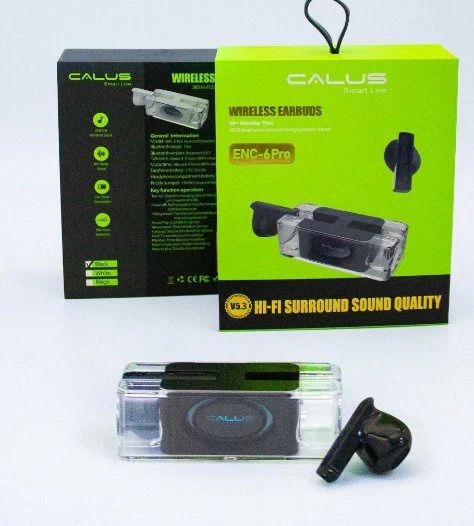
The WLD Store pick: Calus 6 Pro Wireless Earbuds
These are the details stated in the WLD Store listing, reported exactly as written with nothing added.
- Product: Calus 6 Pro Wireless Earbuds, described as TWS Bluetooth earphones.
- Category: Audio Accessories, also listed under Electronics and TV & Home Entertainment.
- Brand: WLD.
- SKU: WLD-KSA-0029-(KD-KD0185).
- Sound: the listing describes deep bass and active noise cancellation.
- Battery: the listing states up to 30-hour total playtime.
- Fit: described as an ergonomic design for comfortable wear.
- Pairing: the listing says they pair with Bluetooth devices.
- Availability: sold across Saudi Arabia through secure checkout.
The Calus 6 Pro product page carries the full specification and current availability, and is the authoritative source if any detail changes.
Pairing wireless earbuds and first setup
- Charge the case fully first. Units often arrive partly charged, and a low case gives misleading battery behaviour on day one.
- Pair with the lid open and both buds in. Most designs enter pairing mode this way rather than with a bud in your ear.
- Remove old entries from your phone. A stale Bluetooth entry from a previous device is the most common pairing failure.
- Test both buds separately. Play audio with one bud in the case to confirm each side works independently.
- Learn the touch controls early. Tap patterns vary, and discovering them accidentally mid-call is unpleasant.
- Try every tip size. Do this before deciding whether you like the sound, not after.
How to test wireless earbuds in the first week
Most faults and most mismatches show up quickly if you look for them deliberately, and the first week is when a return is still straightforward.
- Run a full battery cycle. Listen from a full charge until the buds stop, and note the time. Compare it with the quoted per-bud figure rather than the total.
- Take a call outdoors. Wind is the hardest test for any earbud microphone and the one people never try before the return window closes.
- Walk through a crowded place. Malls and stations are full of competing radio traffic, so dropouts appear there first.
- Watch a video. Check whether lips and sound line up, and switch on any low-latency mode to compare.
- Wear them for two hours straight. Comfort problems with wireless earbuds rarely appear in the first ten minutes.
- Test each bud alone. Confirm both sides work independently, since single-bud failures are a common early fault.
Write down what you find. If a pair of wireless earbuds fails two or more of these tests, it is a mismatch rather than bad luck, and swapping tips or resetting will not fix it.
Getting a proper seal with wireless earbuds
This takes five minutes and transforms the result, so it is worth doing properly on the first day.
Start with the medium tips, insert them and play something with plenty of bass. Then gently press each bud a little further in. If the bass suddenly becomes fuller, your seal was incomplete and you need a larger tip.
Repeat with the large tips. If they feel like pressure rather than contact, or your ears ache within ten minutes, go back down a size. Comfort over an hour matters more than the perfect seal for five minutes.
It is completely normal to need different sizes in each ear, because ear canals are rarely symmetrical. Mixing sizes is not a fault, and many people find it is the fix that finally makes a pair of wireless earbuds work for them.
Insertion angle matters too. Most canals point slightly forward, so a small rotation as you insert often seals far better than pushing straight in.
Listening safely with wireless earbuds
This section matters more than any feature comparison, because hearing damage is permanent and painless while it happens.
Volume and time combine. Loud listening for a short period and moderate listening for a long period can both cause harm, and the risk rises quickly as volume increases. Health authorities broadly recommend keeping personal audio at a moderate level and limiting long sessions.
A useful practical rule is that if someone standing next to you can hear your music, it is too loud. Another is that if your ears feel dull or ring after listening, the level was too high.
Good noise cancelling helps here, because much of the volume people use is an attempt to drown out background noise. With less noise reaching you, a lower volume sounds perfectly clear.
Situational awareness deserves the same care. Do not wear noise cancelling wireless earbuds while cycling in traffic or crossing busy roads, use transparency mode where it exists, and check local rules about wearing earphones while driving.
Anyone who notices ringing, muffled hearing or pain should stop and seek medical advice. Children should use volume-limited devices, and the small parts in any earbud case are a genuine choking hazard for very young children.
Living with wireless earbuds in a hot climate
Heat, dust and sweat all shorten the life of small electronics, and all three are part of daily life across much of the Gulf.
Start with the car. A closed vehicle in summer reaches temperatures that damage lithium cells quickly, so leaving a charging case on a dashboard or in a glovebox is one of the fastest ways to lose battery capacity permanently.
Sweat is next. Salt is corrosive, and it collects on charging pins as well as on the buds themselves. Wiping wireless earbuds and the inside of the case after a workout takes ten seconds and prevents the charging faults that appear months later.
Fine dust deserves attention too. It settles in the mesh over the driver and dulls the sound gradually enough that owners often blame the product rather than the debris. A soft dry brush once a week keeps it clear.
Humidity near the coast adds condensation to the list. Let wireless earbuds reach room temperature before putting them into a closed case after coming in from outdoors, and never seal them away while they are visibly damp.
Wireless earbuds care and hygiene
- Wipe the buds after every use. A dry cloth removes sweat and earwax before it sets.
- Clean the mesh gently. A soft dry brush works; never poke the mesh with a pin, which pushes debris inwards.
- Remove and wash silicone tips. Soap and water, dried fully before refitting, keeps them hygienic and preserves the seal.
- Keep the case charging contacts clean. Debris on the pins is the usual cause of a bud that will not charge.
- Do not share them. Ear infections spread this way more easily than most people realise.
- Avoid heat. A closed car in summer is hard on both the batteries and the adhesives holding the drivers in place.
Wireless earbuds problems and quick fixes
- One bud is silent. Clean the charging contacts, then reset the pair and re-pair from scratch. This fixes the majority of cases.
- Sound is thin and bass-light. Almost always a seal problem. Change tip size before blaming the drivers.
- Audio stutters in busy areas. Radio congestion. Keep your phone on the same side as the lead bud and out of a back pocket.
- Callers say you sound muffled. Check for debris over the microphone ports and try speaking with less wind exposure.
Wireless earbuds versus headphones and wired options
Each format has a use case where it clearly wins, and knowing yours saves money.
Over-ear headphones give the best comfort over long periods, the strongest noise cancelling and usually the best sound for the money. They are also bulky, warm to wear in a hot climate, and impractical to carry everywhere.
Wired earphones are the cheapest and have no battery to fail or charge. The trade-off is the cable, and the fact that many phones no longer include the socket they need.
Wireless earbuds win on convenience, portability and freedom of movement, which is why they dominate. The costs are battery life, a higher price for equivalent sound, and components that eventually wear out. For a clear explanation of how the noise cancelling works, see the Wikipedia article on active noise control.
Who wireless earbuds are not for
A few people are genuinely better served by something else.
Anyone who needs full awareness of their surroundings for work or safety should think carefully, or choose an open design that does not seal the ear at all.
People who find anything in the ear canal uncomfortable will not be converted by a better tip. Open-fit or over-ear designs exist precisely for them.
Anyone doing critical audio work, such as mixing music, needs a wired reference rather than a compressed wireless signal, whatever the marketing says about fidelity.
Heavy users of a single device may also want to think twice. Every set of buds has a finite number of charge cycles, and someone listening for eight hours a day cycles the batteries far faster than someone using them for a commute. Over-ear headphones with a much larger battery are the more economical choice in that pattern.
Finally, anyone who regularly loses small objects should be honest with themselves. A single lost bud usually cannot be replaced separately, which turns a small mistake into a full replacement.
Wireless earbuds buying checklist
- How many tip sizes are included? More sizes means a better chance of a real seal.
- Is the quoted battery figure per bud or total? The larger number usually includes the case.
- Do you need noise cancelling, or awareness? They pull in opposite directions.
- How important are calls? Test the microphones in your own environment early.
- Will they face sweat or rain? Check the ingress rating before training in them.
Other popular picks at WLD Store
These three products come from other parts of the WLD Store range and are among the items shoppers browse alongside audio accessories.
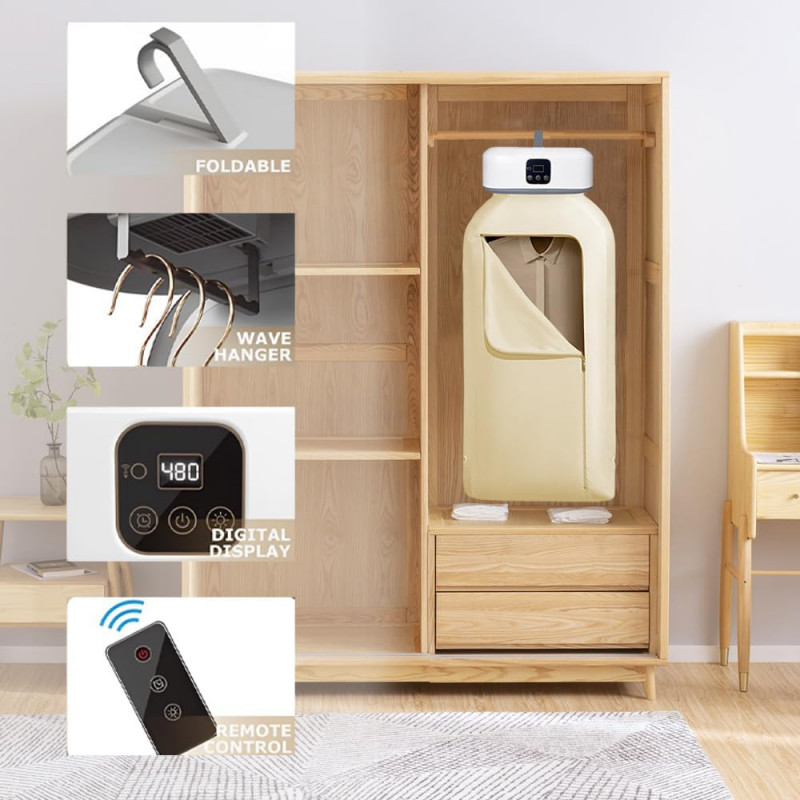

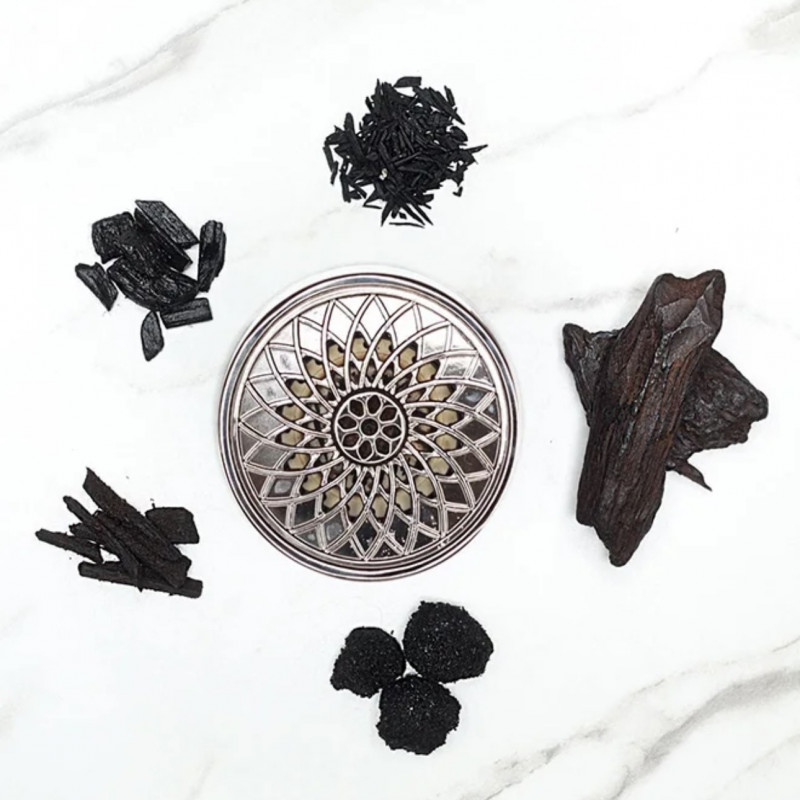
The foldable clothes dryer, the smart blender and the electric bakhoor burner are all listed in the same store if you are browsing beyond audio.
Frequently asked questions about wireless earbuds
How do I know if my wireless earbuds fit correctly?
Play a bass-heavy track and press each bud gently inwards. If the bass becomes noticeably fuller, your seal is incomplete and a larger tip will help. A correct fit feels like contact rather than pressure.
Does active noise cancellation block all sound?
No. It works well on steady low-frequency noise such as engines and air conditioning, and much less well on speech and sudden sounds. Expect a large reduction in drone rather than silence.
Why does the battery not last as long as advertised?
Quoted figures come from controlled tests at moderate volume with features switched off. Higher volume, noise cancelling and a weak connection all draw more power, and batteries lose capacity gradually with age.
Can I wear wireless earbuds while exercising?
Usually yes, if they have a sweat-resistant rating and a secure fit. Wipe them dry afterwards, wash the tips regularly, and avoid noise cancelling in any situation where you need to hear traffic.
What volume is safe for daily listening?
Keep the level moderate and take breaks on long sessions. If someone beside you can hear your audio, or your ears feel dull afterwards, it is too loud. Persistent ringing warrants medical advice.
Why does only one bud connect sometimes?
Usually a charging contact issue or a confused pairing record. Clean the contacts in the case, forget the device on your phone, reset the buds, and pair again from scratch.
Good wireless earbuds are the ones that fit your ears, hold a stable connection and let you listen at a sensible volume all day. Test the tips properly, read the battery figure as a total, and keep them clean. If that sounds like what you need, see the Calus 6 Pro Wireless Earbuds listing, or browse the wider range in the Audio Accessories section.




Add comment