An apple wireless charger that handles three devices at once solves a specific problem: iPhone, Apple Watch and AirPods each arrive with their own charging arrangement, and none of them shares a cable with the others. This guide explains exactly what to check before buying an apple wireless charger, why the watch is always the fussiest of the three, how to set the pad up so all three devices are full by morning, and what to do when one of them refuses to charge. There is also a section on realistic charging speeds, care advice, a troubleshooting list, a buying checklist and six frequently asked questions, plus the 3-in-1 pick stocked at WLD Store.
Why one pad beats three cables
Anyone inside the Apple ecosystem is quietly managing three separate charging habits. The phone needs a cable or a pad, the watch needs its own round puck that fits nothing else, and the AirPods case needs either a cable or a wireless surface depending on which generation it is. Left to itself, that becomes three leads in three rooms.
A single apple wireless charger collapses all of that into one place on a desk or a nightstand. The practical benefit is not aesthetic, it is behavioural: when there is one obvious spot, everything gets put there, and everything is charged in the morning without anyone having to remember anything.
There is a hardware benefit too. Lightning and USB-C ports wear out, and they wear out fastest on the device you plug in daily. Charging by induction leaves the port alone, which matters if you intend to keep a phone for four or five years or to sell it on in good condition later.
Finally there is travel. A folding apple wireless charger replaces a bundle of leads in a bag, and the watch puck in particular is the item most often left behind in a hotel drawer. Consolidating all three into one object removes that risk entirely.
The Apple-specific things you must check
This is where most disappointment comes from, and all of it is avoidable with five minutes of checking before you order.
The iPhone. Wireless charging works through the Qi standard, which iPhones have supported since the iPhone 8. Newer models also add a magnetic ring that snaps the phone into perfect alignment. Any competent apple wireless charger will handle the phone; it is the other two devices that vary.
The Apple Watch. This is the one to check carefully. The watch does not charge on a general-purpose Qi surface. It needs a dedicated watch charging area designed for it, so confirm that the product explicitly provides one rather than assuming a third circle on the pad will do the job.
The AirPods case. Wireless charging support depends on the generation of the case, not the earbuds inside it. Some cases charge on a pad, some only take a cable, and two cases that look nearly identical can differ. Check the case you actually own before buying an apple wireless charger on the assumption it will take all three.
Cases and accessories. Thick phone cases, metal card wallets and mounting plates all sit between the two coils and either slow charging or block it entirely. If you use a rugged case, test with it off first so you know what correct behaviour looks like.
What makes a good apple wireless charger
Once compatibility is settled, these are the details that decide whether the pad is a pleasure or a nuisance.
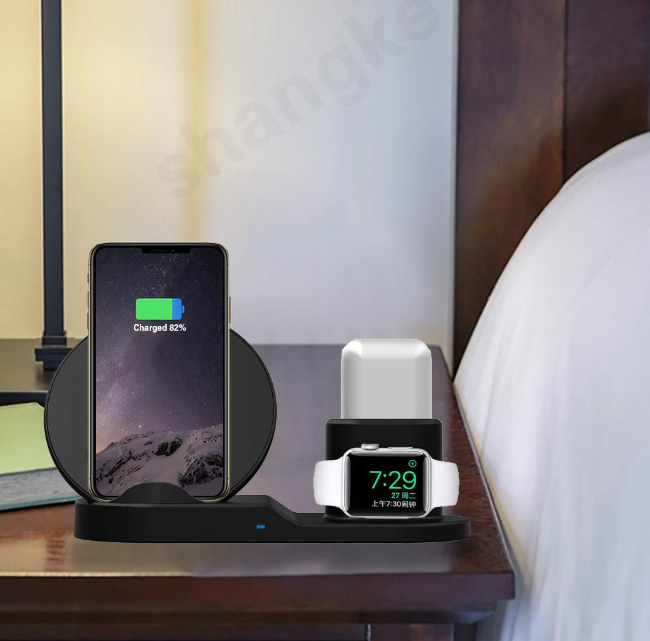
A proper watch charging position
Look at how the watch sits. Some designs lay it flat, others hold it on its side so the screen stays readable as a bedside clock. The upright arrangement is genuinely more useful overnight, and it also keeps the band from being bent into an awkward position for eight hours.
Magnetic alignment for the phone
Magnets remove the single most common failure in wireless charging, which is a phone that looked like it was charging and was actually two centimetres off centre. On an apple wireless charger with a magnetic ring, the phone snaps into place and you never think about it again. Without magnets, look for a lip, a cradle or a grippy surface instead of a flat slab.
The power supply behind it
A three-device pad needs a decent adapter feeding it, and many pads are sold to be used with one rather than including one. Check the listing to see what is in the box, because an underpowered adapter is by far the most common reason a pad charges slowly. This is a five-dollar problem that gets blamed on the charger.
Footprint, angle and the light
Decide where it will live before you choose the shape. On a desk, an angled stand lets you read notifications and unlock by looking while the phone charges. On a nightstand, a low profile and a dim or absent indicator light matter far more. A bright blue LED beside a pillow is a genuine annoyance.
Whether it travels
If the pad is going in a bag, look for one that folds flat and holds together when closed. A folding apple wireless charger that springs open in a rucksack and scratches a laptop lid is worse than the cables it replaced.
The WLD Store pick: 3-in-1 Wireless Charger for Apple Devices
Here is what WLD Store lists for this product, with nothing invented:
- Product: 3-in-1 Wireless Charger for Apple Devices
- Brand: WLD
- Category: Electronics
- What it is: a way to neatly charge iPhone, Apple Watch and AirPods on a single pad
- Availability: available across the USA through secure checkout
- SKU: WLD-US-0013-(CJ-CJSJSJSJ00535)
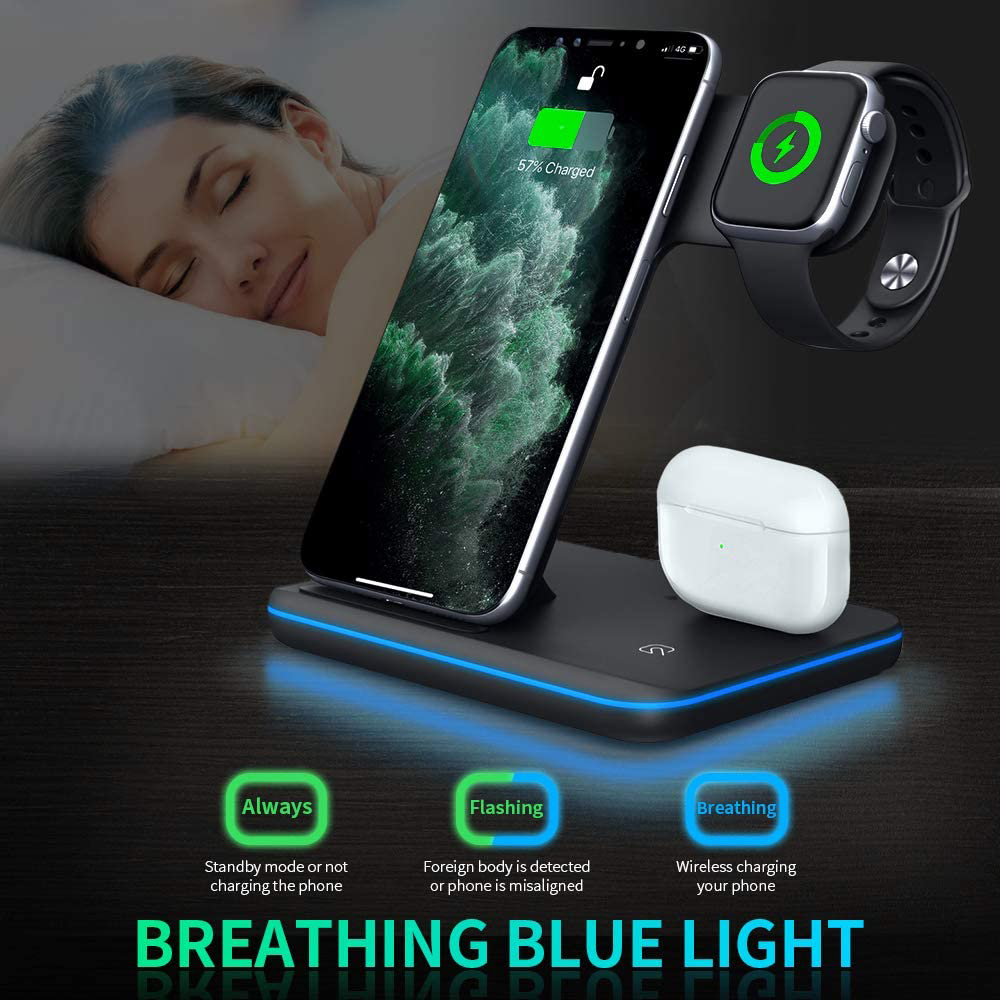
The useful part is that it is designed as a three-device apple wireless charger rather than a general pad you have to share between devices, so the watch and the case each get their own position. Photographs, options and current availability are on the 3-in-1 Wireless Charger for Apple Devices product page, which is where to confirm the details for your own models before ordering.
Setting it up properly
Ten minutes of care on day one prevents most of the complaints people have about these pads months later.
- Pick the spot and the socket together. Decide where the pad lives, then check a plug is within reach without trailing a cable across a walkway.
- Use a capable adapter. Three devices drawing at once need a proper supply. Reusing an old low-power plug from a small accessory is the classic mistake.
- Test each device individually first. Phone alone, then watch alone, then the AirPods case alone. If one fails, you immediately know which one.
- Take the phone case off for the first test so you can tell the difference between a charging problem and a case problem.
- Check the watch actually starts charging, not just that it sits in the cradle. Look for the charging symbol before you rely on it overnight.
- Learn the positions in the dark. Place everything once with the lights off; if it works by feel, the apple wireless charger will be used every night rather than most nights.
Give it one full night before judging. Three full batteries in the morning means the setup is right, and from then on there is nothing left to manage.
How fast will it actually charge?
Wireless charging has a reputation for being slow, and the honest answer is that it is slower than a cable but usually fast enough for the way people really use it.
Overnight is the point. Across eight hours, the difference between a fast cable and an apple wireless charger is irrelevant, because both finish long before you wake up. The pad wins on convenience across that window.
Short top-ups favour a cable. If you have twenty minutes before leaving the house, plug in. Induction loses energy as heat, so it will never match a wired connection over a short burst.
The adapter sets the ceiling. A capable supply behind the pad matters more than anything printed on the pad itself. Underfeeding an apple wireless charger is the most common cause of results people blame on the charger.
Heat slows everything. Phones deliberately reduce charging speed when warm to protect the battery. A pad in direct sunlight, on top of a radiator, or buried under papers will be slower than the same pad in a cool, open spot.
Watches and cases finish quickly. Both draw far less than a phone, so after the first hour or two most of the available power goes to the handset anyway.
Nightstand, desk or travel bag?
The same three-device pad suits all three roles, but the right shape differs, and it is worth deciding before you buy.
Nightstand. Prioritise a dim indicator, a stable base you can find in the dark, and a watch position that keeps the screen visible so it works as a clock. A phone at a slight angle is easier to check at night than one lying flat.
Desk. Here an upright angle earns its place, because you can see notifications and unlock by looking without picking the phone up. Weight matters too: a light pad slides when you pull the phone off one-handed, so a heavier base or a grippy foot is worth having.
Travel. Folding designs win, and the deciding feature is whether the pad stays shut in a bag. An apple wireless charger that travels well replaces three cables and, crucially, the easily forgotten watch puck.
If you want one for two of these roles, buy for the harder one. A travel-friendly apple wireless charger works perfectly well on a desk, while a heavy desk stand is not going anywhere.
Care and maintenance
There is almost nothing to maintain, but a few habits keep a pad working properly for years.
- Keep the surfaces clean. Grit between a phone and the pad scratches both. A dry or barely damp cloth is all that is needed.
- Never leave metal on it. Coins, keys and card holders can heat up on an active charging surface, so clear the pad before putting anything else down.
- Watch the cable at the strain point. The lead into the back of an apple wireless charger flexes every time the unit moves. Replace it at the first sign of fraying.
- Give it air. Do not tuck the pad under papers or behind a cushion; trapped heat slows charging and is hard on batteries.
- Check the watch cradle for dust. A thin film in the recess is enough to lift the watch slightly and break the connection.
Beyond that, an apple wireless charger has no moving parts. Fed properly and kept clean, it should simply keep working in the background.
Common problems and quick fixes
- The watch will not charge. Check it is seated squarely in its own dedicated position and that nothing, including a thick band or a dust film, is holding it off the surface. Also confirm the product supports the watch at all rather than assuming a spare circle will work.
- The AirPods case charges on a cable but not on the pad. That case generation probably does not support wireless charging. It is a limitation of the case, not a fault in the apple wireless charger.
- The phone charges intermittently overnight. Vibration is nudging it out of alignment. Silence notification vibration, or use a magnetic or cradle position that cannot drift.
- Everything is slow. Try a stronger adapter, then remove the phone case, then correct alignment. In that order those three account for the large majority of complaints.
- The phone gets hot. Remove the case, move the pad out of direct sun, and check nothing metallic is trapped between phone and surface.
Buying checklist
- Does it have a real Apple Watch position? A general Qi circle will not charge a watch, so this is the first question to settle.
- Does my AirPods case support wireless charging? Check the generation you own rather than the product family.
- What is in the box? Confirm whether an adapter and cable are included so nothing arrives unusable.
- Where will it live? Nightstand, desk and travel each favour a different shape of apple wireless charger.
- Will my phone stay put? Magnets, a lip or a cradle beat a flat, slippery pad every time.
Other Electronics picks at WLD Store
Worth a look alongside an apple wireless charger if you are tidying a desk or a hallway:
What an apple wireless charger cannot do
Every guide should be honest about limits, and there are four worth knowing before you spend anything.
It will not charge a non-Apple watch. The dedicated watch position on an apple wireless charger is shaped and powered for one thing. If someone in the house wears a different brand of smartwatch, they will still need their own puck.
It will not beat a cable for speed. No amount of marketing changes the physics of induction. If you regularly need a fast top-up before running out of the door, keep a cable on the desk as well and use the pad for overnight charging.
It will not fix a tired battery. A phone that dies by mid-afternoon has a battery health problem, and moving it to an apple wireless charger only changes where it is charged. Check battery health in settings before assuming the charger is at fault.
It will not charge through everything. Thick armoured cases, metal card holders and magnetic mount plates all block the field. If you rely on a heavy protective case, either accept removing it at night or choose a cable instead.
None of these are reasons to avoid a pad. They simply define what an apple wireless charger is for: consolidating three overnight charging habits into one place, on a desk or a nightstand, with no cables to find. Used that way it is genuinely excellent, and the households that end up disappointed are almost always the ones expecting it to replace every cable in the building rather than the three it actually replaces.
Frequently asked questions about an apple wireless charger
Will an apple wireless charger work with my iPhone case on?
Usually, if the case is thin plastic, silicone or leather. Thick rugged cases, wallet cases holding cards, and anything containing a metal plate will slow charging or stop it completely. If charging is unreliable, removing the case is the first test to run.
Can any wireless pad charge an Apple Watch?
No. The watch needs a charging area designed specifically for it, which is why three-device pads list the watch separately. A standard Qi surface will do nothing at all for a watch, no matter how it is positioned on the pad.
Do all AirPods cases charge wirelessly?
Not all of them. Support depends on the generation of the case, and cases that look almost identical can behave differently. Check the specific case you own before relying on the third position of an apple wireless charger.
Is it safe to leave everything charging all night?
Yes. Each device manages its own charging and stops drawing power when full. What to avoid is covering the pad with fabric or leaving metal objects on the surface while it is powered, both of which trap heat.
Does wireless charging wear out the battery faster?
Heat is what degrades lithium batteries, and induction produces more heat than a cable. In practice a well-ventilated, correctly aligned pad in a cool spot is perfectly reasonable for daily use, and it saves the charging port from years of mechanical wear.
Do I still need to carry a cable?
One short cable in a bag is sensible for emergency top-ups and for any device that does not charge wirelessly. Most people end up with an apple wireless charger at home and a single cable in the bag, which covers both patterns without duplicating anything.
The short answer
Confirm the watch position, confirm your AirPods case generation, feed the pad with a proper adapter and sort out alignment once. Do that and an apple wireless charger quietly removes three separate charging chores from every day.
Photographs, options and current availability are on the 3-in-1 Wireless Charger for Apple Devices page, and the rest of the range is in the Electronics section. Available across the USA through secure checkout.





Add comment