A multi-functional wireless charger replaces the small pile of cables most people keep beside a bed or on a desk with a single powered surface. The appeal is not really about speed. It is about the moment you put a phone down and a watch down and a case of earbuds down, and all three simply start charging without you finding three different connectors in the dark.
This guide covers how inductive charging works, what the four-in-one format genuinely delivers, why heat is the most important variable nobody mentions, how to position devices so they actually charge, and what to check before buying. There is a maintenance routine, a troubleshooting list, a buying checklist, six common questions and an honest section on who should stay with cables.
Why a multi-functional wireless charger beats a drawer of cables
Count the connectors in an average household and the number is uncomfortable. A phone, a watch with its own proprietary puck, a case of earbuds, a tablet, a power bank, and each of them wants a different cable or a different orientation. The cables tangle, they migrate between rooms, and the one you need at eleven at night is always the one somebody took to the office.
A multi-functional wireless charger addresses that by making the surface the interface. Devices charge by being placed rather than by being plugged, and the number of cables in the room drops to one. That single change is worth more in daily life than any charging speed figure, because it removes a small friction that repeats several times a day.
The second benefit is wear. Charging ports are among the first things to fail on a phone, partly from lint and partly from thousands of insertion cycles, often at an angle. A pad removes almost all of that mechanical stress. A multi-functional wireless charger will not stop a port from collecting dust, but it dramatically reduces how often anything is pushed into it.
The third is tidiness in a shared space. A bedside table with one pad and one cable looks and functions differently from one with four cables draped over the edge. In an office the same applies: a single powered surface at the corner of a desk keeps the working area clear, which matters more than people expect when the desk is also where you eat lunch.
How a multi-functional wireless charger actually works
The underlying principle is induction, and it is older than the phones that use it. A coil in the charging pad carries an alternating current, which creates a changing magnetic field. A matching coil in the device sits in that field, and the changing field induces a current in it. That current charges the battery. No metal contacts touch, which is why a sealed phone can charge without any opening in its case.
Qi is the standard that lets devices from different manufacturers agree on how to do this, including how they negotiate power levels and how they stop when something is wrong. The Wikipedia page on the Qi standard is a good primer if you want the detail. A 15W figure describes the maximum the pad is designed to deliver under favourable conditions, not a guaranteed constant rate.
Two consequences follow from the physics, and both explain most complaints about this category. First, alignment matters, because the coils must overlap for energy to transfer efficiently. Second, some energy always becomes heat, which is why any multi-functional wireless charger runs warm and why a hot phone deliberately slows its own charging to protect the battery. Neither is a defect; both are the mechanism working as designed.
What makes a good multi-functional wireless charger
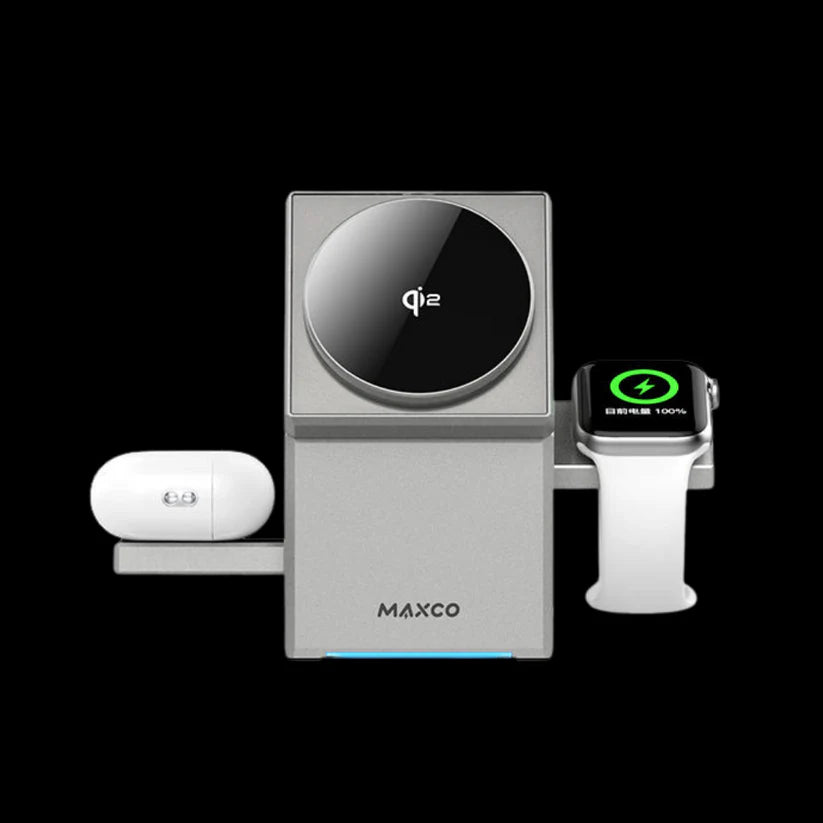
Once you strip away the marketing, four things decide whether a pad is pleasant to live with.
The layout of the charging zones
A four-in-one pad has to physically fit a phone, a watch, an earbud case and a second device without them fouling each other. Check that the phone area is long enough for a large handset, that the watch section leaves room for a strap to hang rather than bunch, and that a case sitting in one zone does not overhang another. A multi-functional wireless charger with a cramped layout looks fine in a photograph and annoys you every single night.
Power delivery and the input side
A 15W fast Qi rating describes what the pad can deliver to a compatible device in good conditions. The part that is easy to overlook is the input: a pad supplying several devices at once needs an adequate power source behind it. Plugging a multi-device pad into a low-power port is the most common reason people report slow charging, and it has nothing to do with the pad itself.
Surface grip and stability
The surface has two jobs: hold a device still and let you pick it up easily. A slightly tacky, non-slip finish does both. A glossy one lets a phone slide out of alignment when a notification buzzes, which is exactly how people wake up to a phone at nine percent. Weight matters too, since a light pad travels across the desk when you lift a device off it.
The indicator, and whether it lets you sleep
An LED indicator is genuinely useful for confirming a device has landed correctly, and genuinely irritating if it is bright and permanent on a bedside table. The best implementations are dim and unobtrusive. If you plan to keep a multi-functional wireless charger beside a bed, this small detail matters more than any specification on the box.
The WLD Store pick: Multi-Functional Wireless Charger
These are the confirmed details from the product record, with nothing added.
- Product: Multi-Functional Wireless Charger, a 4 in 1 charging pad
- Category: Accessories, filed under Chargers and Cables
- Brand: WLD
- SKU: WLD-KSA-0126-(KD-157)
- Devices: charges up to four devices at the same time
- Compatibility: iPhone, Apple Watch, AirPods and Android devices
- Speed: 15W fast Qi charging
- Indicator: LED status light
- Form factor: compact, sized for a desk or bedside table
- Availability: available across Saudi Arabia with secure checkout
Photos and current options are on the Multi-Functional Wireless Charger product page. Prices are deliberately left out of this guide, because listings change and a stale figure helps nobody. Everything that follows applies to this pad and to the multi-functional wireless charger category in general.
Nine easy ways to get the best from a multi-functional wireless charger
- Use a capable power source. A pad feeding four devices needs real input. An old low-output adapter is the single most common cause of disappointing speed.
- Centre the phone, do not eyeball it. Find the sweet spot once, then note where the edge of the phone sits relative to the pad so you can repeat it in the dark.
- Take thick cases off if charging is slow. Distance between coils reduces efficiency sharply, and a heavy protective case adds several millimetres.
- Remove metal from between the coils. Card holders, metal plates for magnetic mounts and coins on the pad all interfere, and some heat up.
- Give the pad air. Do not put a multi-functional wireless charger on a cushion, a folded towel or a stack of paper. Trapped heat slows charging for everything on it.
- Keep the watch strap clear. Loop the strap away from the charging zone so it does not lift the watch off the surface at an angle.
- Wake the pad if a device does not start. Lift and replace rather than nudging, since detection usually triggers on placement.
- Charge overnight rather than in short bursts. Wireless is best suited to long, low-stress top-ups; use a cable when you need twenty percent in ten minutes.
- Keep it out of direct sun. A pad on a sunlit windowsill is already warm before it starts working, and it will throttle sooner.
Placement: where a multi-functional wireless charger should live
On a bedside table. This is the classic case and the one the format suits best. Place it within arm’s reach but not where you will knock it while reaching for a glass of water. If the LED is bright, angle the pad so the light faces away from the pillow.
At a desk. The far corner on the side of your dominant hand works best, because you put a phone down without crossing your body. Keep it behind the keyboard line so it is not in the space where your forearm rests, and run the cable towards the same port cluster your other peripherals use.
In a living room. A side table beside where people actually sit beats a shelf across the room. A multi-functional wireless charger only works if devices get placed on it, and that only happens when it is where hands naturally go.
Where not to put it. Anywhere it might get wet, anywhere it sits on soft fabric, and anywhere in direct afternoon sun. All three are heat or safety problems rather than convenience problems.
Heat, cases and why a multi-functional wireless charger slows down
Slow wireless charging generates more complaints than any other issue in this category, and it is almost always one of four things.
Underpowered input. The pad can only pass on what it receives. If several devices are drawing at once from a weak source, everything charges slowly. This is the first thing to check and the easiest to fix.
Misalignment. A phone two centimetres off centre may still show a charging symbol while transferring very little. If a device is warm but the percentage barely moves, alignment is the likely cause.
Heat throttling. Phones deliberately reduce charging speed when the battery gets warm, because heat is what shortens battery life over years. A multi-functional wireless charger in a warm room in summer will therefore charge more slowly than the same pad in an air-conditioned office, and that is the device protecting itself.
Obstructions. Thick cases, pop sockets, metal ring holders and cards left in a folio case all sit between the coils. The general principles behind this are covered well on the Wikipedia inductive charging page.
Care and maintenance for a multi-functional wireless charger
Weekly. Wipe the surface with a barely damp cloth and dry it immediately. Dust and skin oils build a film that reduces grip, and a slippery pad leads to devices sliding out of position overnight.
Monthly. Check the cable at both ends, particularly where it enters the pad, since that is the point that flexes. Look for any deformation or discolouration on the charging surface, which would indicate persistent overheating.
Ongoing. Keep liquids away from it, never cover it while it is working, and unplug it before cleaning. Do not use solvents or alcohol wipes on a textured surface, because they degrade the grip coating that stops your phone sliding.
Store a multi-functional wireless charger flat rather than coiled inside a bag with the cable wrapped tightly around it. Tight coiling is what breaks cables, and the cable is usually the first part of the assembly to fail.
Common multi-functional wireless charger problems and quick fixes
- One zone works and another does not. Confirm the device in the dead zone supports wireless charging at all, then check alignment. Some earbud cases only charge wirelessly in specific models.
- The phone charges then stops repeatedly. Usually a case or a small metal object shifting position. Remove the case and test again on a bare phone.
- Everything charges slowly. Check the power source first. A multi-functional wireless charger sharing an underpowered supply across four devices will be slow at all of them.
- The pad is very hot to touch. Move it off soft surfaces and out of sunlight. If it stays uncomfortably hot on a bare desk with nothing charging, stop using it.
- The watch will not sit flat. The strap is bunching underneath. Undo it and let it fall clear of the charging zone.
Buying checklist for a multi-functional wireless charger
- Do all my devices actually support wireless charging? Check each one before buying, especially older earbud cases and Android handsets.
- Will my phone physically fit its zone with a case on? Measure the pad area against your phone rather than assuming.
- What will power it? A multi-functional wireless charger is only as fast as its input, so plan for a capable adapter.
- Is the indicator light suitable for where it will live? A bright LED is fine on a desk and unwelcome beside a bed.
- Do I need speed or convenience? If you frequently need a fast emergency top-up, keep a cable as well.
Who a multi-functional wireless charger is not for
If you own a single device and it lives on a cable, this adds cost and complexity for no benefit. The format earns its place when three or four devices need charging in the same spot.
It is also wrong for anyone who charges in short, urgent bursts. Wired fast charging remains meaningfully quicker for a ten-minute top-up before leaving the house, and no wireless pad in this class changes that. Heavy users who run a phone flat by mid-afternoon will be happier with a cable and a power bank.
Finally, if your devices are older, check compatibility carefully. A multi-functional wireless charger cannot add wireless charging to a phone that lacks the hardware, and no adapter ring turns a non-Qi earbud case into a Qi one in a satisfying way.
Multi-functional wireless charger versus a multi-port cable charger
A multi-port cable charger wins on raw speed and on universality. It charges anything with the right cable, including devices that have no wireless capability at all, and it delivers full fast-charge rates to every port. What it does not solve is the cable problem, because you still need one lead per device and they still tangle.
A pad wins on the daily experience. Placing a device is faster than plugging one in, it works in the dark, and the surface stays visually calm. The trade is speed, a little heat, and a hard requirement that every device supports the standard.
Many people end up with both: a multi-functional wireless charger beside the bed for overnight convenience, and a multi-port cable charger in a bag for travel and fast top-ups. If you can only have one and you travel constantly, take the cables.
Other accessory picks at WLD Store
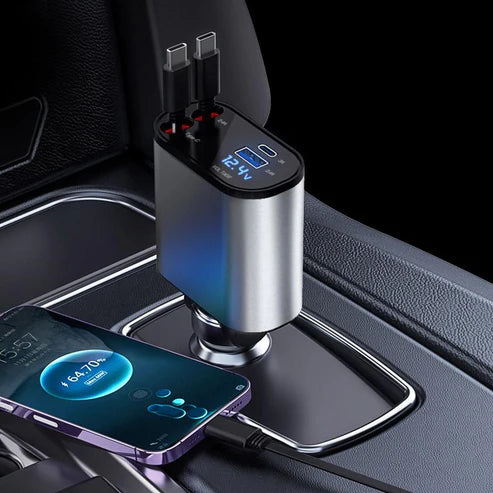
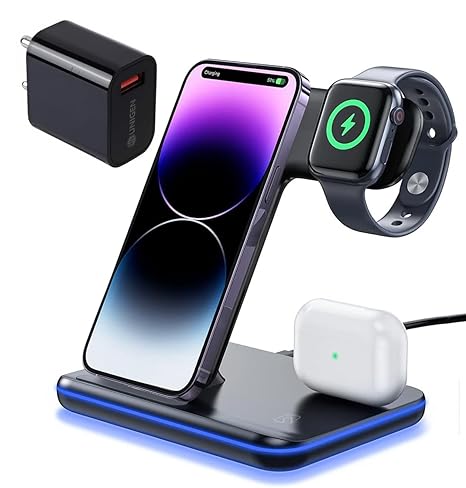
Three related products that pair well with a multi-functional wireless charger.

Frequently asked questions about a multi-functional wireless charger
Can a multi-functional wireless charger charge four devices at once?
Yes, that is the design, and this pad is described as charging up to four devices simultaneously. The practical caveat is the power source behind it: several devices drawing at the same time share what the input supplies, so a capable adapter matters.
Will a multi-functional wireless charger work through a phone case?
Thin cases are usually fine. Thick protective cases, anything with a metal plate for a car mount, and folio cases holding cards are the common failures. If charging is slow or intermittent, remove the case and test the bare phone first.
Is 15W the speed my phone will actually get?
It is the maximum the pad is built to deliver in good conditions, not a constant. Real speed depends on the device, its own charging limits, the ambient temperature and how well the coils are aligned. Warm rooms in particular slow things down.
Is it safe to leave a device on it overnight?
Yes. Devices and Qi pads negotiate power and stop drawing when the battery is full, which is why overnight is the use case this format suits best. Keep the pad on a hard surface with air around it rather than on fabric.
Why does my multi-functional wireless charger get warm?
Some energy always becomes heat in an inductive transfer, so warmth is expected and normal. What is not normal is a pad that stays hot with nothing on it, or one that becomes too hot to touch comfortably. In that case stop using it.
Does it work with Android as well as iPhone?
Yes. The listing covers iPhone, Apple Watch, AirPods and Android devices. Any handset that supports the Qi standard will charge on the phone zone; the watch zone is the part most tied to a specific ecosystem.
A multi-functional wireless charger is a convenience product first and a speed product a distant second, and buying it with that expectation is the difference between satisfaction and frustration. Give it a capable power supply, keep it off fabric and out of the sun, learn where your phone needs to sit, and it will quietly remove several small annoyances from every day.
You can view the pad on its product page, or browse the full accessories range in the Chargers & Cables section.



Add comment