A good lcd screen cleaning kit turns a smeared, dusty display back into something you can actually read. Screens are the surfaces we touch most and clean least carefully, and the improvised fixes most of us reach for cause quiet damage over time.
A shirt sleeve pushes grease around. A paper tissue drags trapped grit across the coating. Household glass cleaner can attack the anti-glare layer on a modern panel. This lcd screen cleaning kit guide explains what belongs in a proper set, what each piece is for, the order of steps that actually works, and how to keep the kit usable for years.
Why an lcd screen cleaning kit beats a shirt sleeve
Modern displays are not bare glass. Phone, laptop and television panels carry a stack of thin optical layers above the pixels: an anti-reflective coating, often an anti-fingerprint layer, and on touch devices an oleophobic film that stops your fingertip from squeaking. Those layers are measured in microns and are easy to scratch or dissolve.
That is the real argument for an lcd screen cleaning kit. Ammonia and alcohol strip oleophobic films, which is why a phone that once shrugged off fingerprints suddenly collects them after a few sessions with the wrong spray. The damage is gradual, so most people never connect the cause with the result.
Dust is the second problem, and it is mechanical rather than chemical. Screens hold a static charge that pulls fine particles toward them and keeps them there. Wiping a dusty panel without lifting the grit first is essentially sanding it, and the swirl marks that appear under bright light are the proof.
There is a practical case too. Working through a proper lcd screen cleaning kit takes about two minutes per device and produces a finish that lasts. Improvised cleaning takes just as long, has to be repeated far more often, and leaves the streaks that make you start again.
What makes a good lcd screen cleaning kit
Kits vary more than the packaging suggests. A useful lcd screen cleaning kit is judged on four things: what is in the bottle, the quality of the cloth, whether it includes tools for the places a cloth cannot reach, and whether it is portable enough that you actually use it.
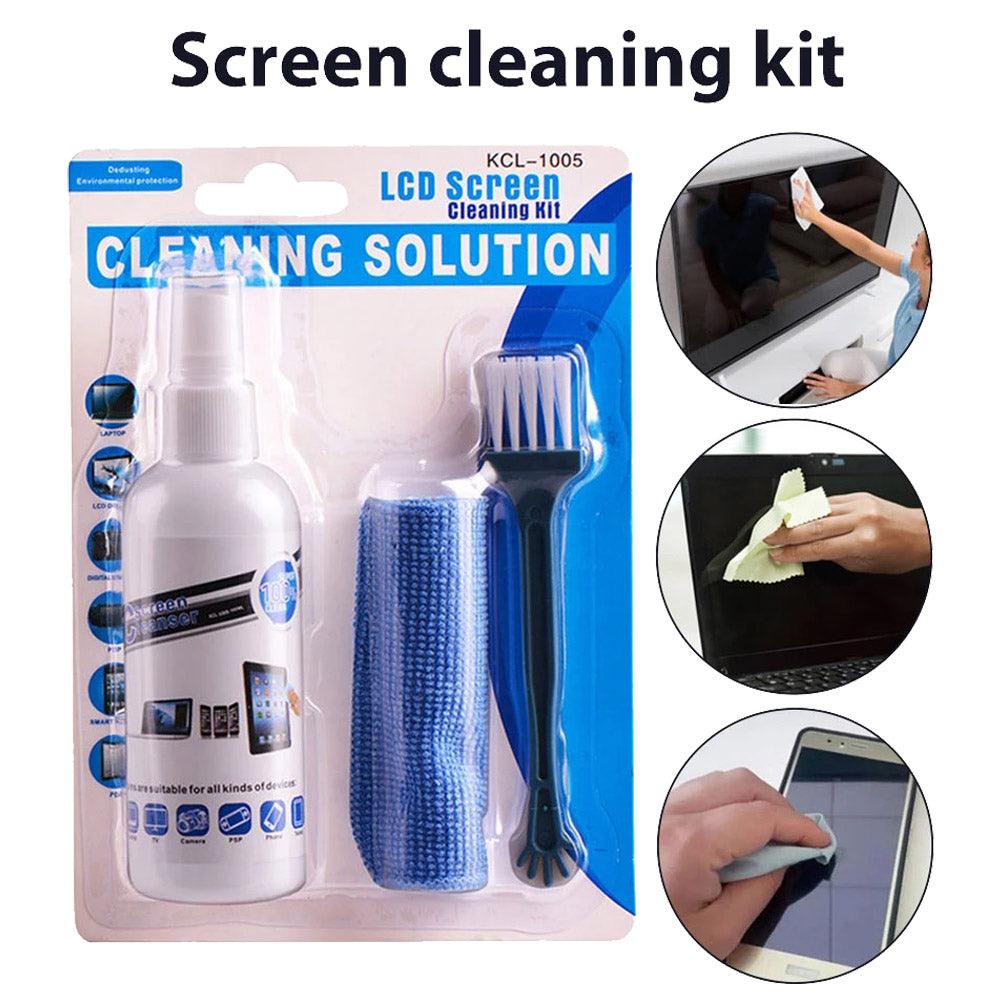
The cleaning solution
The liquid should be intended for screens, not for windows. Screen sprays are built around purified water with mild surfactants that lift oil without stripping coatings. An anti-static formula, like the one in this kit, does a second job: it neutralises the charge that attracts dust, so the panel stays clean noticeably longer between wipes.
The microfiber cloth
The cloth matters as much as the spray. Microfiber is made from filaments far finer than cotton, split into wedge shapes that trap oil and particles inside the fabric instead of dragging them along the surface. That trapping action is why a microfiber cloth lifts fingerprints with water alone, and why any lcd screen cleaning kit without one is incomplete.
Brushes for dust and edges
Bezels, speaker grilles, keyboard gaps and the seam around a laptop screen collect dust that no cloth will reach. A soft brush sweeps loose particles away before liquid ever touches the panel. The fine pen brush handles the tightest work: camera lenses, port openings and the corners where the frame meets the glass.
Wipes and portability
Pre-moistened wipes are the version you use when you are away from your desk, and they matter more than they sound. A kit that lives in a drawer at home gets used weekly; one that fits in a laptop bag gets used whenever a screen needs it. The best lcd screen cleaning kit is the one within arm’s reach.
The WLD Store pick: LCD Screen Cleaning Kit
This is the lcd screen cleaning kit WLD Store stocks for shoppers who want one set that covers every screen in the house rather than a single bottle of unknown liquid.
- Product: LCD Screen Cleaning Kit, a 6 in 1 monitor and phone cleaner
- Listed contents: spray, microfiber cloth, brush, cleaning wipes and pen brush
- Formula: anti-static, designed to remove fingerprints and dust
- Suitable for: phones, laptops, tablets, TVs and camera lenses
- Category: Home & Kitchen
- Brand: WLD · SKU: WLD-KSA-0120-(KD-098)
- Availability: available across Saudi Arabia through secure checkout
Full details, current photographs and the option to order sit on the LCD Screen Cleaning Kit product page. Because the set covers several device types, one kit usually replaces the assortment of half-used bottles most households accumulate.
How to use an lcd screen cleaning kit: 7 easy steps
Order matters more than effort. Follow these seven steps and a screen comes out clear on the first pass instead of the third.
- 1. Power down and unplug. A dark screen shows every mark, and a powered-off device removes any risk from stray moisture near ports.
- 2. Let it cool. A warm panel evaporates liquid before you can spread it, which is exactly how streaks form. Give a laptop or TV a few minutes.
- 3. Brush the dust off first. Sweep loose particles from the glass, bezel and frame with the soft brush. This single habit prevents most swirl scratches.
- 4. Spray the cloth, never the screen. Two or three light pulls onto the microfiber, until it is barely damp. Liquid sprayed directly can run down into the bezel and reach the electronics.
- 5. Wipe in one direction. Straight overlapping passes from top to bottom, with no pressure beyond the weight of your hand. Circles redeposit what you just lifted.
- 6. Detail the edges. Work the pen brush along the seam, then the corners and any camera glass, where grease tends to build unnoticed.
- 7. Buff dry. Turn to a dry section of the cloth and go over the panel once more to lift the last of the moisture and any remaining haze.
The whole sequence takes roughly two minutes. On a television, run it standing to one side so that raking light shows the marks you would otherwise miss from straight on.
Cleaning different screens with one lcd screen cleaning kit
The same tools apply differently across devices, and knowing the differences is what stops a good lcd screen cleaning kit from being used badly.
Phones and tablets are the dirtiest and the most forgiving. They carry face oil, pocket lint and hand cream, but their cover glass is toughened and the oleophobic layer responds well to a barely damp cloth. Use the least liquid here, and clean the rear camera glass at the same time.
Laptop screens need the most care. Many are matte or semi-matte with a soft anti-glare finish that marks under pressure, and the panel flexes if you push. Support the lid from behind with your free hand and let the cloth do the work. Clean the keyboard afterwards, since keys are what transfer oil back onto the display when the lid closes.
Televisions are mostly a dust problem rather than a grease one. Brush the panel and the frame first, wipe with a lightly dampened cloth, and pay attention to the top edge and the stand, where household dust settles heavily and is then blown back onto the screen.
Camera lenses are the one place to slow down. Blow or brush the loose grit away completely before anything touches the glass, then use the pen brush for the rim and a barely damp corner of the microfiber for the element itself.
Building an lcd screen cleaning kit routine that sticks
Most people own the right tools and still work with dirty screens, because cleaning is never the most urgent thing on any given day. Attaching it to something you already do solves that. Wipe the phone while it charges overnight; run the cloth over the laptop before you close the lid on a Thursday afternoon.
Split the job by frequency rather than treating it as one large task. A thirty-second wipe of the phone and laptop each week stops oil building into the stubborn film that needs real effort to shift. A fuller session once a month, brush included, covers the television, the monitor stand and the bezels where dust quietly gathers.
Where you keep it decides whether any of this happens. An lcd screen cleaning kit stored in a cupboard behind the household cleaners gets opened twice a year. The same kit in the desk drawer beside the laptop gets used constantly, which is the whole difference between a clean screen and a good intention.
Light matters too. Marks are hardest to spot with a bright window behind you and easiest to spot with the screen off and the room lit from the side. Glance along the panel at an angle before deciding you have finished, and you will rarely need a second pass.
Dust, hard water and hot climates
Conditions matter more than most cleaning advice admits. In a hot, dusty climate like much of Saudi Arabia, screens face a heavier load than the same devices would elsewhere: fine airborne dust settles constantly, air conditioning keeps it circulating, and static holds it in place the moment it lands.
Two habits follow. Brush before every wipe rather than only when the screen looks dusty, because the particles that scratch are the ones too small to see. And make use of the anti-static side of the formula, since lowering the charge on the panel is what actually slows the rate at which dust returns.
Never top up a screen spray with tap water. Hard water leaves mineral deposits as it dries, and those spots are far more stubborn than the fingerprints you started with. The solution in an lcd screen cleaning kit is built around purified water for precisely this reason.
Heat is the last factor. A panel that has been running in a warm room dries liquid almost on contact, which guarantees streaking however careful your technique. Switch the device off, give it a few minutes, and clean once the glass is close to room temperature.
Care and storage that keeps the kit working
A microfiber cloth is a consumable, not a permanent tool. Once it is saturated with oil it stops trapping and starts smearing, which people usually blame on the spray. Wash it every few weeks in warm water with a little plain detergent, rinse thoroughly and air dry.
Keep fabric softener and dryer sheets away from it. Both work by coating fibres, and a coated microfiber cloth loses exactly the property you bought it for. The same goes for washing it alongside towels or anything that sheds lint.
Store the lcd screen cleaning kit closed and together, ideally in a drawer rather than on a windowsill. Direct sun degrades the solution over time, and a cloth left in the open collects the dust it is meant to remove. Keep the spray upright so the nozzle does not dry out.
Check the brush bristles occasionally and pull out any trapped hair or fibre. A brush carrying grit stops being a dust remover and becomes the thing that scratches the panel.
Common problems and quick fixes
Almost every complaint about screen cleaning traces back to one of these four causes.
- Streaks that keep coming back. Too much liquid, or a cloth already loaded with oil. Use fewer sprays, then buff with a clean dry section until the panel is completely dry.
- Fine scratches under bright light. Dust was ground into the surface. Always brush before you wipe, and retire any cloth that has been dropped on the floor until it has been washed.
- Dust returning within a day. Static, not poor cleaning. This is where the anti-static formula in the kit earns its place, and why dry dusting a screen tends to make matters worse.
- A rainbow or cloudy patch after cleaning. Usually a sign the coating met something too strong. Stop using household cleaners on that device and stay with the screen-safe solution from your lcd screen cleaning kit.
An lcd screen cleaning kit versus a single spray bottle
A standalone screen spray is cheaper to buy and covers the basic job, and if you own one device and keep it in a clean room it may be all you need. What it does not do is deal with dust before the wipe, reach into bezels and grilles, or travel with you.
A full lcd screen cleaning kit is the better answer for a household with several screens, for anyone who works on a laptop away from a desk, and for camera owners who need a fine brush they can trust near glass. It is also easier to keep honest: one kit, one set of tools, no guessing which bottle under the sink is safe on a television.
Buying checklist before you order
Five questions worth answering before any lcd screen cleaning kit goes into a basket.
- Is the solution intended for screens? A screen-safe, anti-static formula matters far more than bottle size.
- Does it include a real microfiber cloth? A thin polyester square is not the same thing and will not trap oil.
- Are there tools for the dust? A brush and a fine pen brush cover the areas a cloth simply cannot.
- Will it cover every device you own? Check that phones, laptops, tablets, TVs and lenses are all listed.
- Will it travel? Wipes and a compact set are what turn an occasional clean into a routine one.
Other Home & Kitchen picks at WLD Store
If you are tidying up more than screens, these three sit in the same part of the catalogue and solve related household jobs.
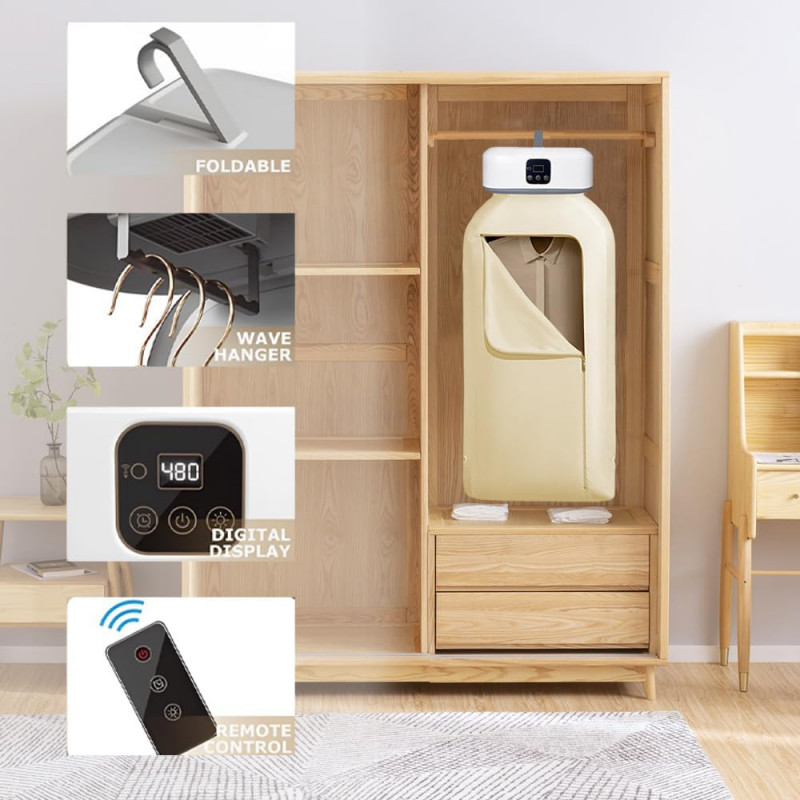

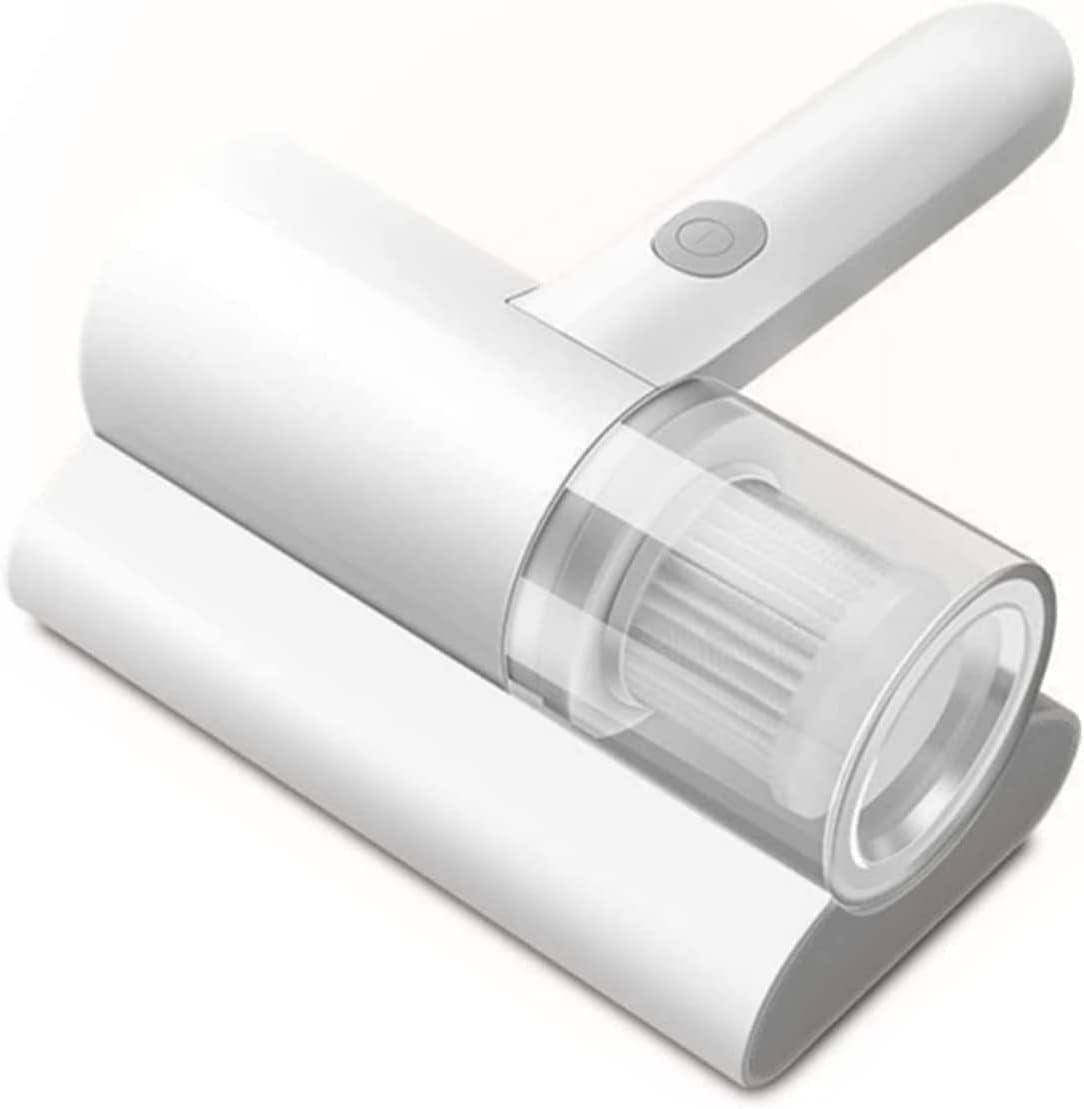
The Dust & Mite Vacuum Cleaner in particular pairs well with an lcd screen cleaning kit, since less airborne dust in a room means less of it settling on your panels.
Frequently asked questions about the lcd screen cleaning kit
Can I use the kit on a laptop keyboard and case?
Yes. The brush and a lightly dampened cloth work well on keys, trackpads and plastic or metal casing. Keep liquid away from key gaps and vents, and let everything dry fully before you close the lid or power the machine back on.
How often should I clean my screens?
A phone benefits from a quick wipe every few days because it is handled constantly. Laptops and monitors suit a weekly clean, and televisions are usually fine every two or three weeks unless the room is dusty. Reaching for the lcd screen cleaning kit little and often is easier than an occasional deep clean.
Is the spray safe on OLED and touchscreens?
A screen-formulated, anti-static solution applied to a cloth rather than the panel is the standard approach for both. The rules that protect an LCD protect an OLED too: no ammonia, no alcohol, no pressure. If a manufacturer publishes its own instruction, follow that first.
What should I never use on a screen?
Window cleaner, kitchen spray, rubbing alcohol, vinegar, paper towels, tissues and dish sponges. Each one either strips a coating or scratches it. That short list is the whole reason a dedicated lcd screen cleaning kit exists.
How long does the microfiber cloth last?
Well cared for, a good cloth lasts a long time and can be washed many times. Replace it when it feels stiff, stops absorbing, or leaves haze that a second dry pass will not clear, which is the point at which the fibres are permanently loaded.
Is one kit enough for a whole household?
For most homes, yes. One lcd screen cleaning kit covers phones, tablets, laptops, monitors and a television comfortably. Households spread over two floors sometimes keep a second set upstairs simply because a kit that is close to hand is a kit that gets used.
A clean screen is a small thing you notice every single day: better contrast, less eye strain, and none of the low-grade irritation of reading through someone else’s fingerprints. The right lcd screen cleaning kit makes that a two-minute habit rather than a chore you keep postponing.
You can see the full listing on the LCD Screen Cleaning Kit product page, or browse the wider range in the Kitchen Tools section for more home and everyday essentials available across Saudi Arabia.




Add comment