A 3 in 1 charging station replaces the tangle of cables that most desks and bedside tables collect over time. Instead of one lead for the phone, another for the earbuds and a proprietary puck for the watch, a single pad handles all three at once.
This guide explains how these docks actually work, what separates a stable one from a wobbly one, how to position it so every device lands on its coil, and how to keep a 3 in 1 charging station running reliably for years. You will also find a practical buying checklist, honest notes on who should skip this format, and answers to the questions shoppers in Saudi Arabia ask most often before ordering.
Why a 3 in 1 charging station is worth the desk space
The case for a 3 in 1 charging station starts with what people carry. Most of us now have three rechargeable items in daily rotation: a phone, a pair of wireless earbuds and a smartwatch. Each traditionally came with its own cable and its own plug. That is three wall sockets, three cables draped across a surface and three chances to grab the wrong one in the dark.
A 3 in 1 charging station collapses that into one plug and one surface. The saving is not only tidiness. It is the habit it creates. When there is a single obvious place to put everything down, devices actually get charged instead of sitting at nineteen percent on a kitchen counter.
There is a second benefit that is easy to miss. Wireless pads have no connector to wear out. Charging ports are among the first things to fail on a phone, usually from lint, dust and repeated insertion. Dropping the handset onto a 3 in 1 charging station instead of plugging it in each night takes hundreds of insertion cycles off that port every year.
Finally, a dock of this type is portable in a way three separate chargers are not. One item goes in the weekend bag. That matters if you travel between Riyadh and Jeddah for work, or simply move between a home office and a family room.
What makes a good 3 in 1 charging station
The 3 in 1 charging station category has a wide quality range, and the differences are not always visible in a product photo. Four things separate a dock you keep from one that ends up in a drawer.
Charging speed and the Qi standard
Wireless charging works by inductive coupling: a coil in the pad creates a changing magnetic field, and a coil in the phone converts it back into current. The common language that lets a pad and a handset agree on power levels is Qi, maintained by the Wireless Power Consortium. You can read the technical background on inductive charging if you want the physics.
In practice, the number to look at is the wattage the phone coil is offered. A 15W pad is the current mainstream ceiling for Qi phone charging and is comfortably faster than the 5W trickle that early pads delivered. Earbud cases and watches draw far less, so they are rarely the bottleneck.
Footprint and how it sits on a desk
A charging dock lives on prime real estate. Measure the space beside your monitor or on your nightstand before ordering. A compact 3 in 1 charging station that tucks behind a lamp gets used; a sprawling one that crowds a keyboard gets moved and then forgotten.
Check the shape as well as the size. Some docks are flat trays, some fold into an upright stand, and some are a single moulded slab with three marked zones. Flat trays are the most forgiving to place and the easiest to wipe down.
The base and how well it stays put
An anti-slip base is not a luxury feature on a wireless dock. Because you place devices rather than clip them in, any sliding shifts the phone off its coil and charging stops silently. A rubberised underside keeps the whole 3 in 1 charging station anchored when you drop a phone onto it one-handed.
The same logic applies to the device-facing surface. A slightly grippy top layer stops a glass-backed handset creeping toward the edge overnight.
Indicators, cases and small details
An LED indicator tells you the pad has power and that the device has been recognised. Without one, a misaligned phone looks exactly like a charging phone until morning. Look for an indicator that is visible but not bright enough to light a bedroom.
Case thickness matters too. Wireless charging tolerates a few millimetres of plastic or silicone, but thick armoured cases, metal plates and cardholder wallets interfere. If you use a rugged case, plan to remove it or choose a slimmer one for daily use.
The WLD Store pick: 3-in-1 Wireless Charging Station
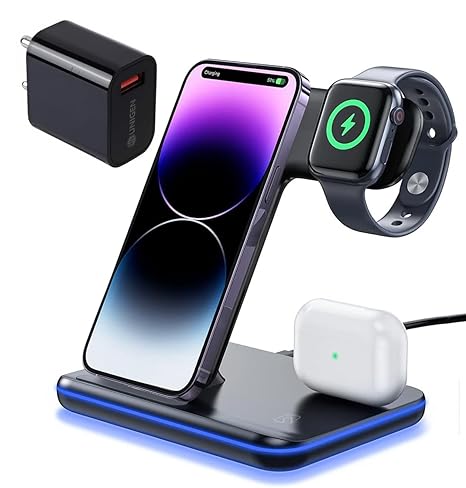
WLD Store lists a 3 in 1 charging station built around exactly the priorities described above. Here is what the listing states, with nothing added:
- Product: 3-in-1 Wireless Charging Station, sold under the WLD brand.
- Category: Accessories, in the Chargers & Cables section.
- What it does: charges a phone, an earbuds case and a smartwatch at the same time from one dock.
- Charging: 15W fast Qi charging, compatible with iPhone and Android handsets.
- Design: a sleek compact body intended to fit on a normal desk without dominating it.
- Practical touches: an LED indicator and an anti-slip base.
- Availability: stocked for customers across Saudi Arabia, including Riyadh, Jeddah and Dammam.
- SKU: WLD-KSA-0090-(KD-236).
Full images, current stock status and secure checkout are on the 3-in-1 Wireless Charging Station product page.
Setting up a 3 in 1 charging station properly
Unboxing a 3 in 1 charging station takes a minute. Getting reliable charging out of it takes about ten, and it is worth doing once rather than troubleshooting every week.
- Choose the socket first. Decide where the dock will live permanently, then check that the supplied cable comfortably reaches a socket without tension. A stretched cable slowly pulls the dock off the edge of a table.
- Use an adequate power source. A dock feeding three devices needs a wall adapter capable of supplying that total. An old 5W phone plug will make everything charge slowly.
- Find the coil centre. Place the phone, then slide it slowly until the indicator confirms charging. Note where the phone sits and use that position from then on.
- Mark your spot if needed. A tiny piece of tape on the underside edge of the dock gives you a visual reference for aligning the phone in the dark.
- Seat the watch and earbuds. Smartwatch pucks are usually the fussiest element on any 3 in 1 charging station, so confirm the watch shows its charging animation before you walk away.
Give the setup one full night before judging it. If everything is at one hundred percent in the morning, the alignment is right and you can stop thinking about it.
Where to put a 3 in 1 charging station at home
Placement decides whether a 3 in 1 charging station earns its keep. The bedside table is the obvious choice because it matches the natural end-of-day routine, and because a smartwatch used for sleep tracking needs a top-up window somewhere else in the day.
A desk is the alternative, and often the better one for people who wear a watch overnight. Charging the watch while you work removes it from the bedtime routine entirely. A 3 in 1 charging station beside a monitor also keeps the phone visible and upright for notifications.
Avoid three locations. Kitchen counters expose the dock to water and oil. Windowsills in Saudi Arabia get punishing direct sun, and heat is the enemy of both batteries and charging efficiency. Deep shelves make the LED indicator invisible, which defeats the point of having one.
One more consideration: keep the dock away from metal trays, magnetic knife strips and speaker grilles. Metal objects near an induction coil can heat up, and stray magnets can confuse a phone’s sensors.
Care and maintenance
A 3 in 1 charging station is low-maintenance, but it is not maintenance-free. A short routine keeps performance steady.
Wipe the top surface weekly with a dry microfibre cloth. Dust is the most common cause of gradually worsening contact, because it lifts the phone a fraction of a millimetre away from the coil and forces the pad to work harder for less delivered power.
Never spray cleaner directly onto a 3 in 1 charging station. Dampen the cloth instead, and keep liquid away from the cable entry point. Let the surface dry fully before putting any device back on it.
Inspect the cable every couple of months, especially at the strain point where it enters the housing. Fraying there is the most likely failure on any powered accessory. Coil the cable loosely rather than wrapping it tightly around the dock.
Check the anti-slip base too. Rubber feet collect dust and lose grip; a wipe with a barely damp cloth restores them. If the dock has begun to slide, that is usually the reason rather than a worn-out surface.
Common problems and quick fixes
- The phone charges intermittently overnight. Almost always alignment. Remove any card or metal plate from the case, reposition until the indicator lights, and confirm the phone stays put when you let go.
- Everything charges, but slowly. Check the wall adapter rather than the dock. Three devices sharing an underpowered plug will all crawl. Swapping to a higher-output adapter usually solves it in one step.
- The device gets warm. Mild warmth is normal during induction charging. Persistent heat means something is blocking airflow or the dock is in the sun. Move it somewhere cooler and remove thick cases.
- The watch will not charge but the phone will. Watch pucks demand precise seating. Clean the back of the watch, remove any strap that props it at an angle, and reseat it until the charging animation appears.
Taking a 3 in 1 charging station on the road
The travel case for this format is stronger than the desk case. Three devices normally mean three chargers, three cables and a hunt for a free socket in a hotel room that offers two. A single dock reduces the whole problem to one item and one plug.
Pack it flat rather than coiled around the cable. Wrapping the lead tightly around a hard housing is the fastest way to crack the insulation at the strain point, and a damaged cable is the usual reason a working 3 in 1 charging station gets thrown away.
Bring the wall adapter you use at home rather than borrowing an unknown one. The adapter determines how much power the dock can share, so a familiar plug removes one variable when something charges more slowly than expected in a new room.
On arrival, repeat the alignment step from the setup section. Hotel nightstands are often narrow and slightly uneven, and a dock that sat perfectly on your desk can end up half a centimetre off. Two minutes of checking beats waking up to a flat phone.
How power gets shared between three devices
Understanding the power budget removes most of the frustration people have with multi-device docks. The wall adapter sets a ceiling. Everything the 3 in 1 charging station delivers comes out of that single figure, split across whichever zones are occupied.
A phone is by far the hungriest of the three. An earbuds case typically sips a small fraction of what a handset draws, and a smartwatch less again. That imbalance works in your favour: the small devices reach full charge quickly and then stop asking for power, leaving the rest for the phone.
This is why a dock can feel fast some nights and slow on others. If you drop all three on at once, the first hour is shared. If you seat the watch and earbuds an hour earlier, the phone gets a clearer run. Neither approach harms anything, but knowing the mechanism explains the difference.
It also explains the single most common upgrade people make. Swapping a leftover 5W phone plug for a properly rated adapter transforms how a 3 in 1 charging station behaves without changing the dock at all.
Who should skip this format
A 3 in 1 charging station is not the right answer for everyone, and it is fair to say so. If you own only a phone and nothing else that charges wirelessly, you are paying for two coils you will never use. A single pad or a simple cable is more sensible.
Fast-charging enthusiasts should also think twice. Wired charging with a modern high-wattage adapter is still quicker than any Qi pad, so if you routinely need to go from ten percent to full in half an hour before leaving the house, keep a cable for that job.
Finally, if your smartwatch uses a proprietary connector rather than a standard puck, verify compatibility before ordering. Not every watch on the market can be charged by a generic three-zone dock, and that is worth checking against your specific model.
A 3 in 1 charging station compared with separate chargers
The honest comparison is between one 3 in 1 charging station and three individual chargers, and each side wins something.
Separate chargers win on raw speed and on redundancy. If one fails you still have two working. They also let you charge devices in three different rooms at once, which suits households where the watch lives in the bedroom and the earbuds live in a bag.
A 3 in 1 charging station wins on socket count, cable clutter, travel weight and habit formation. It also wins on port longevity, since nothing is ever plugged into the phone. For most single-desk or single-nightstand setups, that combination is the more useful trade.
There is a middle path worth mentioning. Many people keep a dock as the default and one fast cable in a drawer for emergencies. That covers the speed gap without reintroducing the clutter.
Buying checklist
- Do I actually own three wireless-capable devices? If not, a simpler pad is the better purchase today.
- Will my phone case work? Measure its thickness and check for metal plates or card slots before you commit.
- Do I have a suitable wall adapter? A 3 in 1 charging station is only as fast as the plug feeding it.
- Where exactly will it sit? Measure the surface, and confirm a socket is within easy cable reach.
- Is my smartwatch supported? Confirm the watch charges from the dock’s puck rather than a brand-specific cable.
Other accessories picks at WLD Store
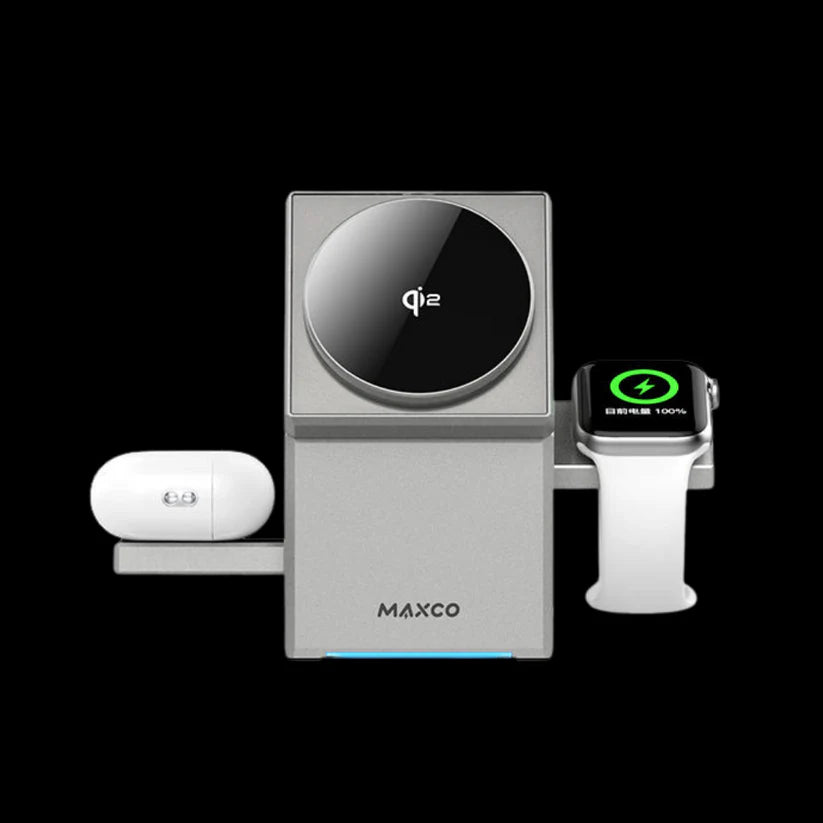
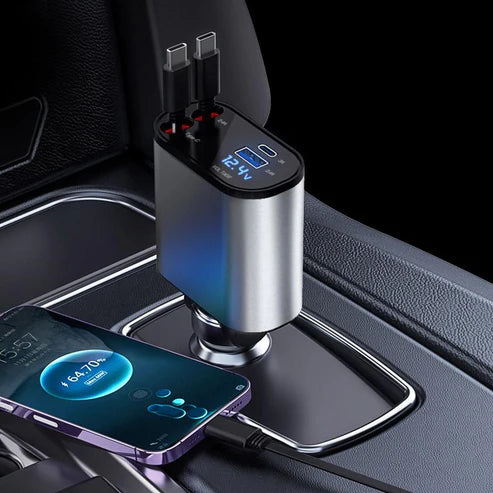
If a three-zone dock is not quite the shape you need, these related accessories cover nearby problems.

Frequently asked questions about the 3 in 1 charging station
Will a 3 in 1 charging station work with both iPhone and Android?
Yes. The WLD listing states 15W fast Qi charging compatible with iPhone and Android handsets. Qi is an open standard, so any phone that supports wireless charging can sit on the phone zone regardless of its operating system.
Can I leave my phone on a 3 in 1 charging station all night?
Yes. Modern phones manage their own charging and stop drawing meaningful current once full. Overnight use on a 3 in 1 charging station is the normal use case rather than an edge case.
Does a case need to come off every time?
Usually not. Thin plastic, silicone and leather cases pass power through without issue. Cases with metal plates for magnetic mounts, embedded cardholders, or very thick armoured shells are the ones that block charging and should be removed.
Why does my phone sometimes stop charging by itself?
The most likely cause is a small shift out of alignment, often from a vibration alert nudging the handset. Reposition it until the LED indicator confirms contact. The second most likely cause is an underpowered wall adapter shared across three devices.
Is wireless charging bad for battery health?
Charging wirelessly generates slightly more heat than a cable, and heat is what ages a lithium battery. In everyday use on a 3 in 1 charging station the difference is small, and keeping the dock out of direct sunlight and away from radiators matters far more than the charging method itself.
Can three devices really charge at full speed at once?
A 3 in 1 charging station divides whatever the wall adapter supplies. A phone, an earbuds case and a watch have very different appetites, so in practice the phone takes most of the power and the two small devices finish quickly regardless. Using a capable adapter is the single best way to keep all three moving.
A 3 in 1 charging station is one of those accessories you stop noticing within a week, which is the highest compliment a desk item can earn. If the format fits your devices, you can see the current listing on the 3-in-1 Wireless Charging Station page or browse the wider range in the Chargers & Cables section, with secure checkout and availability across Saudi Arabia.





Add comment