Touchscreen winter gloves exist because of one small daily indignity: standing at a bus stop in February, pulling a glove off with your teeth to answer a message, and losing all the warmth in that hand for the next twenty minutes. Conductive fingertips remove the choice between warm hands and a usable phone.
This guide explains how the technology actually works, why some gloves stop responding after a few months, how to judge warmth against dexterity, what waterproof really means on a glove label, and how to wash and re-treat a pair without ruining them. The WLD Store thermal pick is described in full below.
Why touchscreen winter gloves are worth having
Phone screens work by detecting the electrical properties of your skin, not by pressure. Ordinary wool or leather insulates that signal completely, which is why a normal glove does nothing at all on a modern screen. Touchscreen winter gloves solve this by weaving conductive fibres into the fingertips so the signal passes through.
The everyday benefit of touchscreen winter gloves is that hands stay covered. Cold hands lose dexterity fast, and once your fingers are properly cold it takes far longer to warm them back up than most people expect. Keeping gloves on through a commute avoids that cycle entirely.
For cyclists and riders the case is stronger again. Taking a hand off the bars in traffic to remove a glove is a genuinely bad idea, and touchscreen winter gloves let you check a route at a red light without exposing skin to wind chill.
There is also the hygiene angle in winter, when handrails, card machines and door handles are all shared. Gloves that let you use your phone mean fewer bare-hand contacts on a cold, crowded commute.
How the technology works
Capacitive touchscreens detect a change in an electrical field at the surface of the glass. Your body is conductive enough to cause that change; wool, leather and most synthetics are not. Conductive thread, usually containing fine metal or carbon fibres, bridges the gap by carrying the signal from your fingertip to the screen.
There are two approaches used in touchscreen winter gloves. Most touchscreen winter gloves put conductive thread only in the pads of the thumb and index finger, sometimes the middle finger too. A smaller number use a conductive yarn throughout the whole glove, which means any part of any finger works.
Whole-glove conductivity is more convenient and generally more accurate, because you are not hunting for a small patch. Fingertip patches are more common and perfectly usable once you know exactly where they are.
Accuracy with touchscreen winter gloves is never as good as a bare finger. The contact area is larger and less precise, so typing a long message is slower. Answering calls, swiping a map, taking a photo and pausing music all work fine, and those cover most of what anyone does outdoors.
What makes a good pair of touchscreen winter gloves
The screen feature is the headline, but a glove that does not keep your hands warm is a failure regardless of how well it swipes. Five things matter.
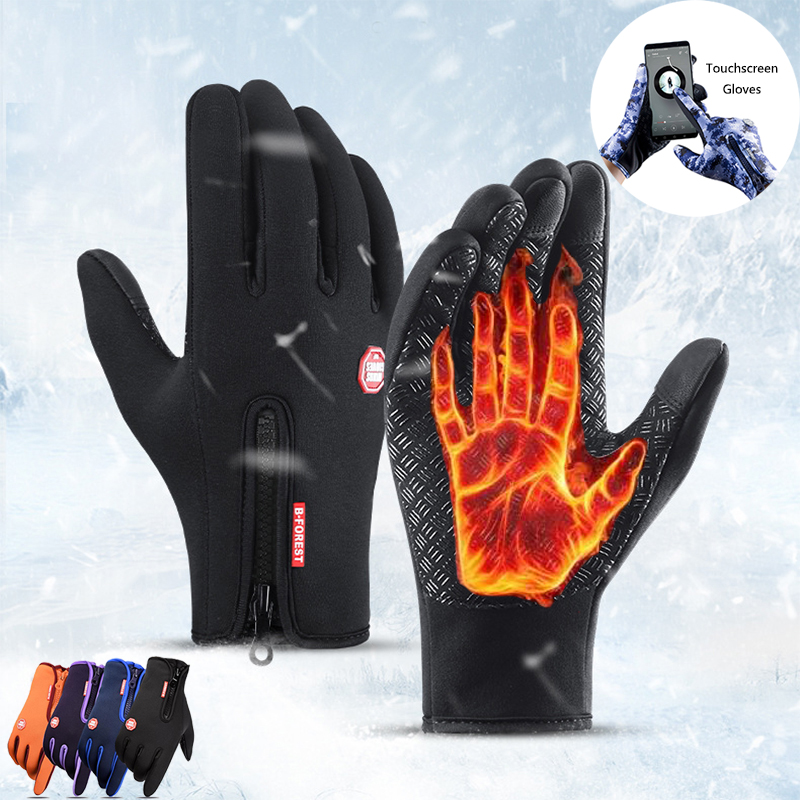
Insulation and how warmth actually works
Warmth comes from trapped air, not from thickness alone. A well-constructed lining holds a layer of still air around the hand, which is why a thin technical glove can outperform a thick bulky one. When comparing touchscreen winter gloves, look at the lining description rather than the apparent bulk.
Fingers are the hardest part to keep warm because they have a large surface area and little muscle to generate heat. This is why gloves that fit too tightly are colder than gloves with a little room: compressing the lining squeezes out the air that was doing the insulating.
Waterproof, water-resistant and breathable
Wet hands get cold very quickly, so water protection matters as much as insulation in most climates. A waterproof outer keeps rain and slush out; a water-resistant one handles a light shower and then wets through.
Breathability is the other half of the equation. Hands sweat, and a completely sealed glove traps that moisture inside, which is why some waterproof gloves still leave you with cold damp hands. Good touchscreen winter gloves balance a protective outer with a lining that can move moisture away.
Grip and palm construction
Look at the palm of any touchscreen winter gloves you are considering. Silicone printing, textured panels or a reinforced palm patch make a real difference when holding handlebars, a steering wheel, a shopping bag or a phone. A smooth nylon palm on a wet day is genuinely slippery.
Grip also protects the glove itself. The palm and the base of the thumb wear out first on any pair, and reinforcement there roughly doubles the useful life.
Cuffs and wind
On touchscreen winter gloves, the gap between glove and sleeve is where the cold gets in. A longer cuff that tucks under a jacket sleeve, or an elasticated wrist that seals against skin, makes more difference on a windy day than a small change in insulation.
For riding, a longer gauntlet-style cuff over the jacket is warmer still, because it stops airflow being forced up the sleeve at speed.
Dexterity
Every pair of touchscreen winter gloves trades warmth against feel. Be honest about which you need: if you have to unlock a bike, handle keys and use a card reader on every trip, a slightly less warm but more dexterous pair will get worn more often than a very warm pair you keep taking off.
The WLD Store pick: Touchscreen Winter Gloves
Here is what WLD Store publishes for this product, with nothing added:
- Product: Touchscreen Winter Gloves, waterproof thermal
- Brand: WLD
- Category: Home & Kitchen
- Description: warm waterproof winter gloves with touchscreen fingertips, made for riding, cycling and daily use
- SKU: WLD-US-0001-(CJ-CJNSFJST00440)
- Availability: available across the USA through secure checkout
The combination to note is warm plus waterproof plus touchscreen. Plenty of touchscreen winter gloves are thin liner types that offer very little insulation, so a pair aimed at riding and cycling is a different proposition. Full images and current options are on the Touchscreen Winter Gloves product page.
Getting the fit right
- Measure your hand. Wrap a tape around your palm at the widest point, excluding the thumb, and compare to the size chart. Hand width is the measurement most makers size by.
- Leave a little air. There should be a few millimetres beyond your fingertips. Gloves pressed hard against the ends of your fingers will always be cold.
- Check the thumb. Thumbs vary more between people than fingers do, and an awkward thumb seam is the most common source of irritation.
- Try the phone before deciding. Fit affects touchscreen accuracy, because a loose fingertip means the conductive pad is not pressed against your skin.
- Consider a liner. If you want the option of extreme cold performance, size touchscreen winter gloves to fit over a thin liner rather than buying a thicker outer glove.
Fit is the single biggest factor in whether touchscreen winter gloves keep your hands warm, and it is the one thing a product description cannot decide for you.
Using them with a phone
Find the conductive patches on your touchscreen winter gloves on day one, in daylight, before you need them in the rain. On most designs they are on the thumb and index finger, and knowing exactly where they are saves a lot of jabbing at a screen with the wrong part of a glove.
Screen protectors reduce sensitivity. A thick tempered glass protector adds distance between the conductive thread and the sensing layer, and it is the most common reason touchscreen winter gloves work less well on one phone than another.
Increase touch sensitivity in your phone settings if the option exists. Many modern phones include a glove or high-sensitivity mode specifically for this, and turning it on transforms the experience.
Keep the fingertips dry where you can. Water sitting on the pad spreads the contact area and makes the screen register a much larger, less accurate touch. A quick wipe on a dry part of your sleeve usually fixes erratic behaviour.
Riding, cycling and driving
For cycling in touchscreen winter gloves, the priority order changes: grip first, wind protection second, insulation third. Fingers wrapped around handlebars are compressed and exposed to airflow, so wind resistance at the back of the hand matters more than raw thickness.
Brake feel is worth testing. A glove that is too bulky makes it hard to modulate a brake lever, which is a safety issue rather than a comfort one. Squeeze the levers before committing to a pair for riding.
For driving, the trade-off is different again. You want thinner gloves that let you feel the wheel and operate a stalk, and warmth becomes less critical once the heater is running. Touchscreen winter gloves used mainly for driving can afford to be lighter than a pair used for standing at a bus stop.
Reflective detailing is worth having for anyone out after dark. It costs nothing and hand signals are exactly where other road users are looking.
Care and maintenance
After a wet ride: pull the gloves into shape and dry them at room temperature, away from radiators. Direct heat cracks waterproof membranes and hardens leather palms.
Every few weeks: wipe the conductive fingertips with a slightly damp cloth. Skin oil and grime build up on the pads and are a leading cause of touch performance dropping off.
Washing: follow the label. Where washing is permitted, use a gentle cycle, cool water and a technical wash rather than ordinary detergent, which leaves residues that block breathability.
Re-treating: water repellency on the outer fabric wears off with use. A spray-on repellent restores it, and it should be applied to clean gloves and left to dry fully.
Storage: dry completely before putting touchscreen winter gloves away for the summer, and store them flat rather than stuffed into a coat pocket where the lining gets crushed.
Common problems and quick fixes
- The screen stopped responding. Usually dirt or moisture on the conductive pad, or a worn thread. Clean the fingertip and dry it; if that fails, the conductive fibres have worn through and the glove cannot be repaired.
- Fingers still get cold. Check fit before blaming the insulation. Gloves that are too tight compress the air layer, and gloves that are too loose let warm air escape at the cuff.
- Hands feel damp inside. That is sweat, not leakage. Reduce layers, or choose a more breathable pair for high-effort activities like cycling uphill.
- Seams have split at the fingers. A common failure on cheap gloves under repeated flexing. Small splits can be stitched, but if the palm has worn through it is time to replace them.
Layering and extreme cold
Below a certain temperature, a single pair of touchscreen winter gloves is not the answer. A thin liner worn under a larger outer glove creates two air layers and can be adjusted independently, which is far more flexible than one very thick glove.
Mittens are warmer than gloves at the same weight because fingers share heat. Some people carry mittens for standing around and touchscreen winter gloves for anything requiring dexterity, and swap as needed.
Hand warmers make a bigger difference than most people expect. A disposable or rechargeable warmer in the palm keeps blood arriving at the fingers warm, which is a more effective route to warm fingertips than adding insulation over them.
Keep your core warm too. When your body is cold it reduces blood flow to the extremities to protect the core, so a warmer hat and jacket genuinely make your hands warmer, whatever gloves you are wearing.
How long a pair should last
Two things wear out on a winter glove, and they wear out at different rates. Knowing which has failed tells you whether to repair, re-treat or replace.
The conductive fingertips usually go first on a heavily used pair. The metal-bearing fibres are fine and they abrade against screens, keys and zips every day. A season or two of daily commuting is a fair expectation, and once the thread is gone the touch function cannot be restored by cleaning.
Water repellency fades much sooner than that, often within a few months, but it is fully recoverable. If rain starts soaking into the outer fabric instead of beading off, wash the gloves and apply a spray-on repellent rather than assuming they are finished.
Insulation degrades slowly and quietly. Linings compress over time, especially at the fingertips where they are pressed hardest, and a pair that felt warm in its first winter can feel thin in its third without anything visibly wrong.
Palms and thumb seams are the mechanical failure points. Anyone who rides will wear these through first, which is why reinforcement there is worth paying for in touchscreen winter gloves intended for handlebars.
A sensible plan is to keep two pairs: a good waterproof pair for wet and cold days, and a lighter pair for mild ones. Alternating them halves the wear on each and means one is always dry.
Who should choose something else
For serious mountaineering or long exposure well below freezing, buy specialist expedition gloves. Touchscreen winter gloves are built for commuting, riding and daily life, and that is a different design brief.
For heavy manual work, a work glove with proper abrasion resistance is the right tool. Conductive threads and reinforced work palms rarely coexist, and the fingertips will wear through quickly on rough materials.
And if you barely use a phone outdoors, you can ignore the feature entirely and buy on warmth alone. There is no point paying for conductivity you will never use.
Buying checklist
- Are the conductive areas on the fingers you actually use, or only on the thumb?
- Is the outer waterproof or merely water-resistant, and does that match your climate?
- Does the palm have grip texture for handlebars, a wheel or a phone?
- Will the cuff seal against wind under or over your jacket sleeve?
- Have you measured your hand rather than guessing your size?
Those five will steer you to the right touchscreen winter gloves faster than any feature list. Fit and cuff design account for most complaints about cold hands.
Other picks at WLD Store
Three more from the WLD Store range for the colder months:
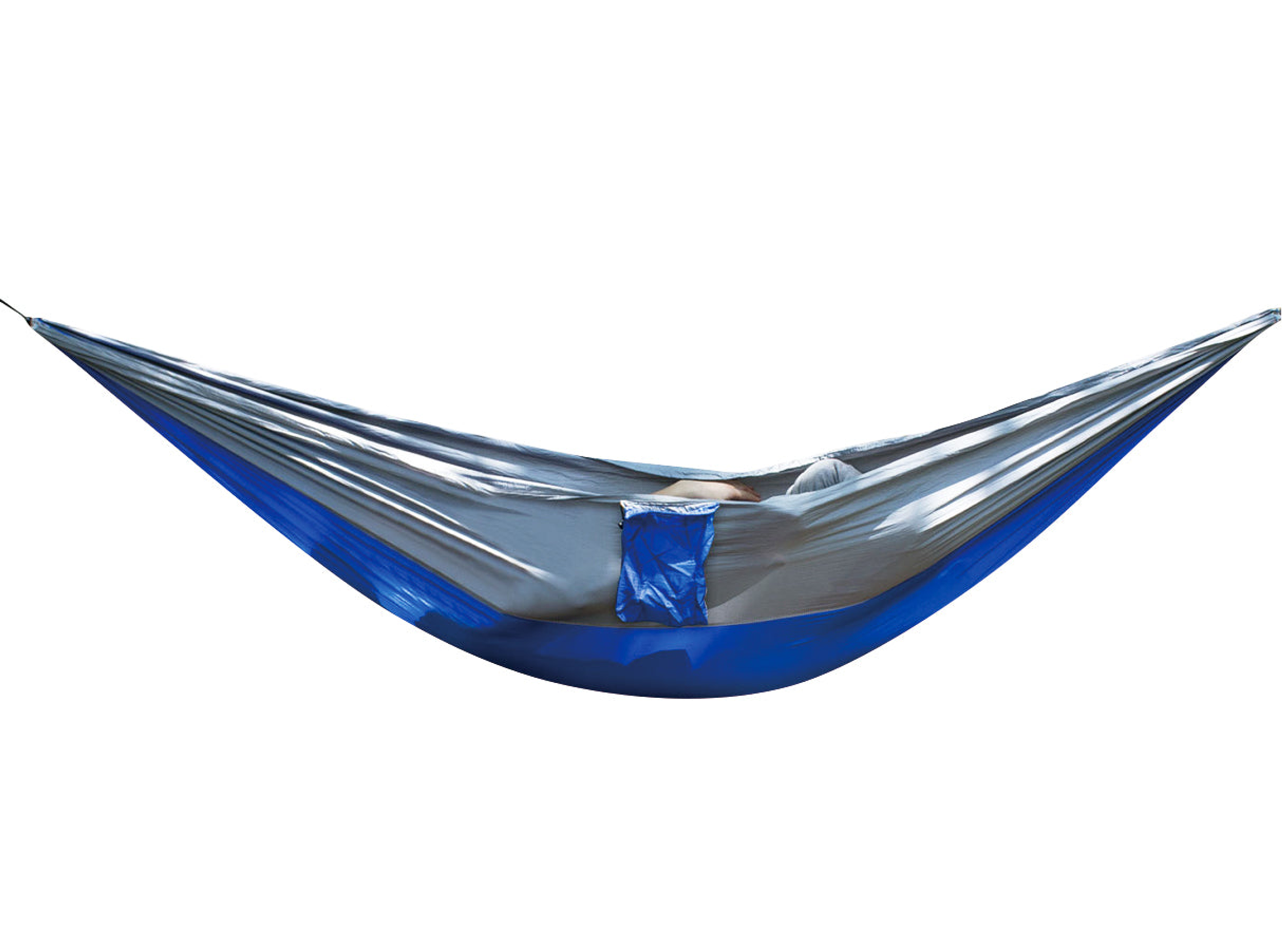
Portable Camping Hammock with Carry Pouch — a packable hammock in its own pouch, for the trips where you need warm hands and somewhere to sit.

Bungalow Eco Pet House — a pet house in the eco range, for keeping a pet’s own corner warm through winter.

The Box Eco Pet House — the box-shaped design in the same eco pet house family.
Everything else is at the WLD Store shop.
Frequently asked questions about touchscreen winter gloves
Do touchscreen winter gloves work on every phone?
They work on any standard capacitive touchscreen, which covers essentially all modern smartphones and tablets. Thick screen protectors reduce sensitivity, so if a pair works on one device and not another, the protector is usually the difference.
Why have mine stopped working on the screen?
Either the pads are dirty or damp, or the conductive fibres have worn away with use. Cleaning fixes the first; the second is permanent, because the conductive thread is woven in rather than coated on.
Can I type properly while wearing them?
Short replies yes, long messages no. The contact patch is larger than a bare fingertip so accuracy drops. Voice input is the practical answer for anything longer than a sentence in cold weather.
Are waterproof touchscreen winter gloves worth the extra?
In any climate with rain, sleet or slush, yes. Wet insulation stops insulating almost immediately, so keeping water out matters more than adding thickness in most winter conditions.
How do I wash them?
Follow the care label. Where washing is allowed, use cool water, a gentle cycle and a technical wash rather than standard detergent, then dry at room temperature well away from any direct heat source.
What size should I order?
Measure the circumference of your palm and use the maker’s chart. Leave a few millimetres of space at the fingertips, since gloves that press against your fingers will feel colder than a slightly roomier pair.
The short version
Buy for fit first, cuff and wind protection second, and treat the conductive fingertips as a convenience rather than a substitute for bare hands. Keep the pads clean, dry the gloves slowly, and re-treat the outer once a season.
The WLD Store option described above is the Touchscreen Winter Gloves, a warm waterproof pair with touchscreen fingertips for riding, cycling and daily use, available across the USA through secure checkout. Browse the rest in the Home & Kitchen section. For the underlying technology, the English Wikipedia article on the touchscreen covers how capacitive sensing works.


Add comment