A magnetic wireless charging stand fixes the one thing that makes ordinary charging pads frustrating: getting the phone in exactly the right place and keeping it there. Instead of sliding a handset around a flat surface hunting for the sweet spot, you bring it near and it clicks into position. This guide explains how magnetic alignment works, what a 5-in-1 magnetic wireless charging stand typically brings to a desk, which specifications genuinely matter and which are noise, and how to set one up so every device is full by morning. There is also a section on magnet safety, bedside use, care advice, troubleshooting, a buying checklist and six frequently asked questions, plus the WLD Store pick.
Why magnets solve the real problem
Wireless charging works by passing energy between two coils, one in the charger and one in the phone. Those coils have to sit close together and reasonably concentric. Move the phone a couple of centimetres off centre and charging either slows dramatically or stops, and on a flat pad there is nothing to tell you that has happened.
That is the actual complaint behind most stories of a phone at forty percent in the morning. It was not a weak charger; it was a phone that had been nudged out of alignment by a notification buzz at two in the morning. A magnetic wireless charging stand removes that failure mode completely, because the magnets physically hold the coils in register.
The magnets themselves are usually a ring of small neodymium magnets arranged around the charging coil. Neodymium is used because it delivers a strong hold from a very small volume, which is what allows a slim stand to grip a heavy phone at an angle without a cradle.
There is a second benefit that people notice within a day. Because the phone is held upright rather than lying flat, you can read notifications, take a video call and unlock by looking while it charges. A flat pad turns the phone into a brick for the duration; a magnetic wireless charging stand keeps it usable.
The third benefit is one-handed use. Pull the phone off, use it, and put it back with one hand without looking. That sounds trivial until it becomes the reason the phone actually gets charged during the working day instead of running down to fifteen percent by five o’clock.
What 5-in-1 usually means, and how to check
Multi-device stands are sold with a number in the name, and the number is not standardised. It usually counts charging positions plus extras, so two products both described as 5-in-1 can offer quite different things.
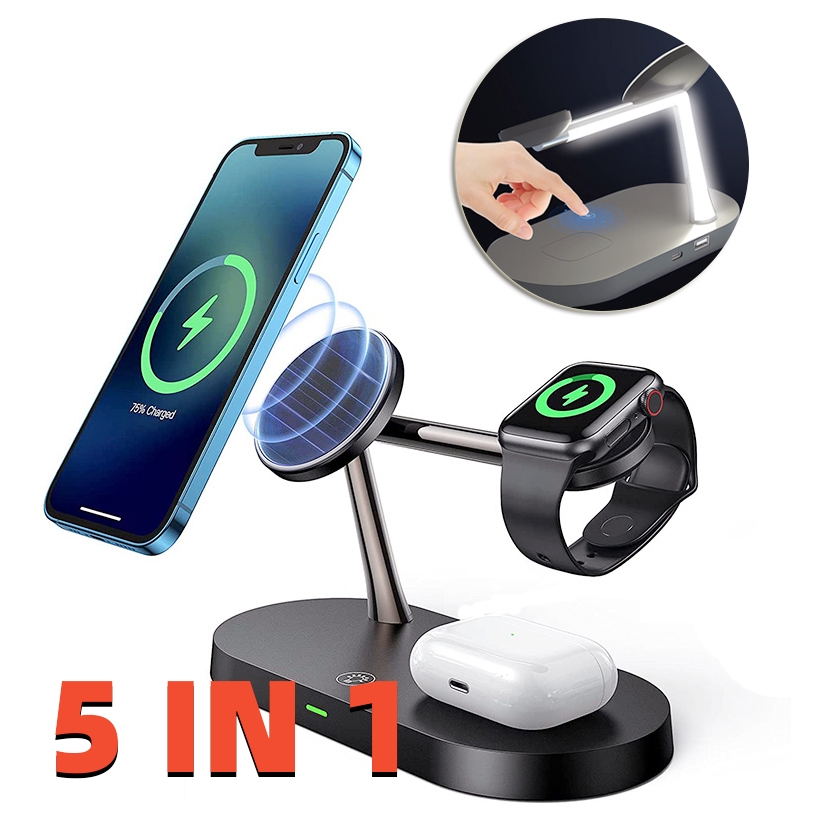
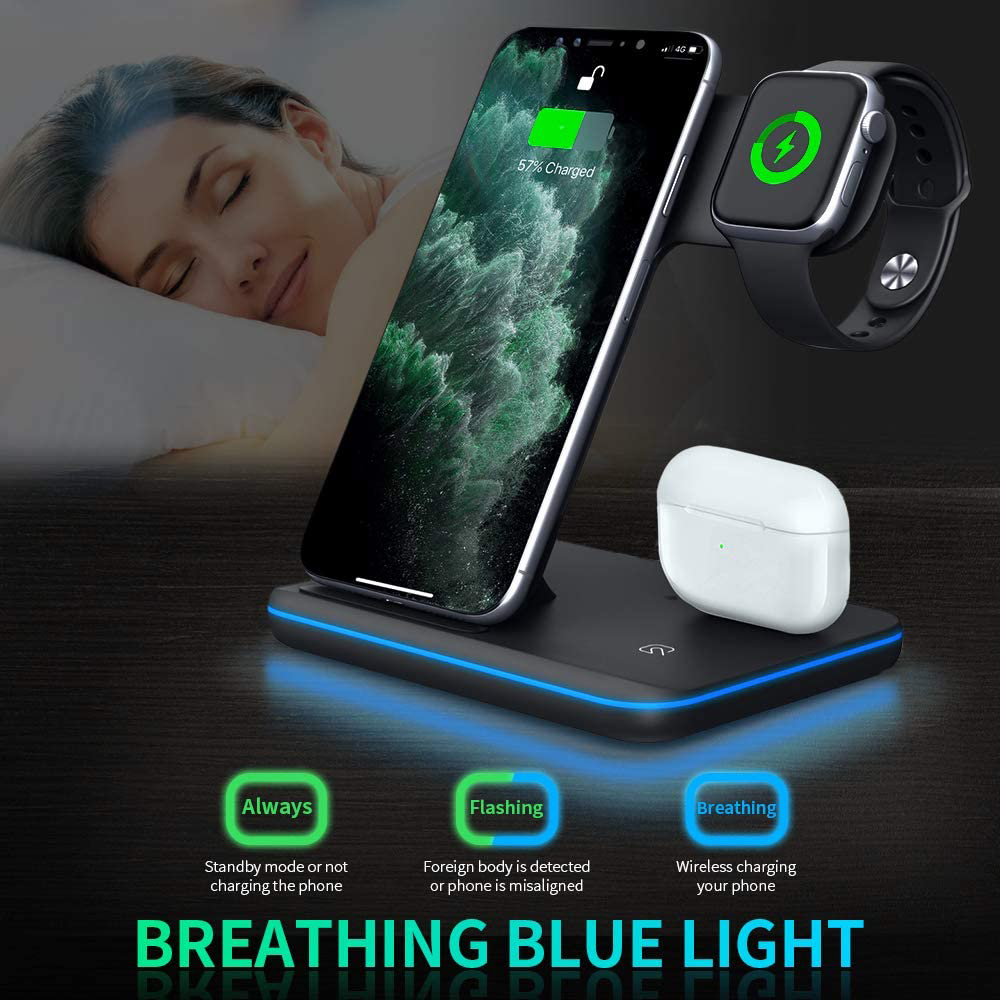
The common positions are a magnetic phone spot, a dedicated smartwatch area, a recess for an earbuds case, and sometimes an additional flat pad or a socket for charging a fourth device by cable. Some counts include a built-in night light, a clock or a removable power bank as one of the five.
The practical approach is to ignore the number and read the description. Write down the devices you own, then confirm each one has a home on the stand. A magnetic wireless charging stand that charges your phone and earbuds but not your particular watch is a two-device stand as far as your household is concerned.
Pay particular attention to the watch position. Smartwatch charging is often brand-specific, and a generic circle on a stand will not necessarily charge the watch you own. This is the single most common mismatch with any multi-device charger.
What makes a good magnetic wireless charging stand
Beyond compatibility, five things separate a stand you keep for years from one that irritates you by the second week.
Magnet strength and hold
The magnets must hold a large phone at an angle, in a case, without creeping downwards over the course of an hour. They should also release cleanly with a light pull rather than dragging the whole stand off the desk. A magnetic wireless charging stand that has to be held down with the other hand to remove the phone has magnets that are strong in the wrong way, or a base that is too light.
If your phone has no built-in magnets, you will need a case with a magnetic ring for the stand to grip. Check that before buying, because the magnets alone will not hold a bare non-magnetic handset.
Viewing angle and adjustment
An adjustable angle is more useful than it sounds. A near-vertical position suits video calls and notification-checking on a desk, while a shallower angle is better as a bedside clock and for tapping the screen without lifting the phone. Some stands also let the phone rotate to landscape, which matters if you watch anything while working.
Base stability and weight
Because the magnets grip firmly, the base has to resist that grip. A heavy base or a wide grippy foot lets you pull the phone off with one hand. This is the detail that most obviously separates a well-designed magnetic wireless charging stand from a cheap one, and it does not show up in photographs at all.
Heat and ventilation
Induction produces heat, and heat is what shortens battery life. Stands that hold the phone upright with air behind it run cooler than flat pads with the phone pressed against a large plastic surface. Anything that keeps devices ventilated is treating your hardware better over the years you will own it.
The cable, the adapter and the socket
Multi-device stands need a proper power supply, and many are sold to be used with a suitable adapter rather than including one. Check what is in the box. Underfeeding a magnetic wireless charging stand is the most common cause of slow charging, and it is entirely fixable for very little money.
The WLD Store pick: 5-in-1 Magnetic Wireless Charging Stand
These are the details WLD Store lists, with nothing added:
- Product: 5-in-1 Magnetic Wireless Charging Stand
- Brand: WLD
- Category: Electronics
- What it is: one magnetic stand to fast-charge phone, watch and earbuds on your desk
- Availability: available across the USA through secure checkout
- SKU: WLD-US-0012-(CJ-CJSJ1089759)
The design intent is a single desk object rather than a drawer of cables, which is exactly what a magnetic wireless charging stand is for. Photographs, the full list of positions and current availability are on the 5-in-1 Magnetic Wireless Charging Stand product page, and that is where to confirm your own watch and earbuds are covered before ordering.
Setting it up on a desk
The stand takes two minutes to place and a few decisions that are worth making deliberately.
- Choose the side of the desk you reach with your dominant hand. The whole point is one-handed pick-up, and a stand on the wrong side undoes that.
- Sort the cable route first. Run the lead behind the desk rather than across it, so pulling the phone off never drags the stand.
- Use a capable adapter. Several devices charging at once need a proper supply, not a spare low-power plug from an old accessory.
- Set the angle once, with your chair in its normal position. Adjust until you can read the screen without leaning, then leave it alone.
- Test each position separately. Phone, then watch, then earbuds case. If something fails, you immediately know which one.
- Check the magnetic hold with your actual case on. A magnetic wireless charging stand behaves differently with a thick case, so test the real combination you use daily.
Once it is set, do not keep adjusting it. The value of a magnetic wireless charging stand comes from muscle memory, and that only develops if the stand stays in one place at one angle.
Magnet safety: what to keep away from it
Neodymium magnets are strong for their size, which is useful for holding a phone and unhelpful for a few other things you may keep on the same desk.
- Magnetic stripe cards. Hotel key cards and older stripe cards can be wiped by close, repeated contact. Keep wallets out of the immediate area rather than resting them against the stand.
- Wallet cases and card holders. If your phone case holds cards behind the magnetic ring, take them out. Modern chip and contactless cards are far more resilient than stripe cards, but there is no reason to test it daily.
- Mechanical watches. Traditional watch movements can be magnetised by prolonged close contact, which affects timekeeping. Do not park one on the base of a magnetic wireless charging stand overnight.
- Medical devices. Anyone with a pacemaker, defibrillator or similar implant should follow their device manufacturer’s guidance on magnets and keep the stand a safe distance from the implant. If in doubt, ask the clinic rather than guessing.
- Loose metal. Paper clips, keys and coins can be attracted to the surface, and metal trapped between phone and charger heats up. Keep the area around the stand clear.
None of this makes a magnetic wireless charging stand risky in normal use. It simply means the stand deserves its own patch of desk rather than sharing a tray with a wallet and a pile of keys.
Using it beside the bed
Desk and bedside are different jobs, and a stand that is excellent at one can be irritating at the other.
The good part is that an upright phone becomes a bedside clock. Set the angle shallower than you would on a desk so the screen faces you when you are lying down, and enable whatever low-light clock display your phone offers.
The thing to check before buying is the indicator light. A bright status LED that seemed harmless in a lit room is genuinely intrusive at three in the morning. If the stand you want has a bright light and no way to dim it, a small piece of dark tape is a legitimate fix.
The watch position matters more at night too, since that is when most people charge a smartwatch. A magnetic wireless charging stand that holds the watch with its screen visible turns it into a second clock; one that lays the watch face down does not.
Finally, think about the pull. Grabbing a phone quickly in the dark should not send the whole magnetic wireless charging stand off the nightstand, which is another reason a weighted base is worth paying attention to.
Care and maintenance
- Keep the magnetic face clean. Dust and grit collect on the ring and get ground between the case and the charger. Wipe it with a dry cloth weekly.
- Do not let metal filings accumulate. Magnets attract them, and they are surprisingly hard to see. A strip of tape lifted off the surface removes them cleanly.
- Check the cable where it enters the base. That point flexes whenever the stand is moved and is the usual failure spot on any magnetic wireless charging stand.
- Keep it out of direct sun. Heat is the enemy of both the battery in your phone and the plastics in the stand.
- Do not clean it with solvents. A barely damp cloth is enough; alcohol and household cleaners can craze plastic and lift printed markings.
There are no moving parts to service, so a stand that is fed properly and kept clean should keep working quietly in the background for years.
Common problems and quick fixes
- The phone slides down slowly. Either the case is too thick for the magnets to grip through, or the case has no magnetic ring at all. A thinner case or a magnetic case solves it; nothing else will.
- The whole stand lifts when I take the phone. The base is too light for the magnets. Add a non-slip mat underneath, or hold the base briefly while learning the release angle, which is a slight tilt rather than a straight pull.
- The watch is not charging. Check it is seated squarely and that the product actually supports your watch. A generic circle on a magnetic wireless charging stand will not charge every brand of smartwatch.
- Charging is slower than expected. Try a stronger adapter first, then remove a thick case, then check the phone is centred on the ring. Those three explain most cases.
- The phone gets hot. Move the stand out of sunlight, clear metal from the surface and take off any heavy case. Warm is normal; hot is not.
Buying checklist
- Does my phone have magnets, or does my case? Without one or the other, the stand cannot hold the phone at all.
- Is my exact watch supported? This decides whether a 5-in-1 is really a 5-in-1 for you.
- Is the base heavy enough for one-handed removal? The single most underrated feature of any magnetic wireless charging stand.
- Can I adjust the angle? Desk and bedside want different angles, and an adjustable stand covers both.
- What do I need to plug into it? Check the listing for the adapter and cable so nothing arrives unusable.
Other Electronics picks at WLD Store
Worth a look alongside a magnetic wireless charging stand if you are setting up a desk or a hallway:
Frequently asked questions about a magnetic wireless charging stand
Will a magnetic wireless charging stand hold my phone if it has no magnets?
Not on its own. The magnets need something ferrous or magnetic to grip, which means either a phone with a built-in ring or a case that includes one. Many people solve this with an inexpensive magnetic case, and after that the stand behaves exactly as intended.
Do the magnets damage the phone?
No. Phones are designed to sit against magnetic accessories, and the internal components are not affected. The things to keep away are magnetic stripe cards, mechanical watches and any implanted medical device, none of which are inside your phone.
Is a stand better than a flat pad?
For most people, yes. A stand keeps the phone visible and usable while charging, holds alignment through notification buzzes, and runs slightly cooler because air can reach the back of the phone. A flat pad is cheaper and takes less desk space, which is its own argument.
Can it charge through a case?
Thin cases are fine, and magnetic cases are designed for exactly this. Thick armoured cases, wallet cases with cards and anything with a metal mounting plate will weaken the hold or block charging outright, so test with your real case before deciding anything is faulty.
Why is charging slower than my cable?
Induction loses energy as heat, so wireless will always trail a wired connection. A magnetic wireless charging stand is designed for the eight hours you are asleep or the hours you are at a desk, not for a ten-minute dash before leaving the house.
Can two people share one stand?
They can, though it works best when each person has their own device positions rather than swapping. In shared households the usual arrangement is one stand per desk or nightstand, because the value comes from everything having a fixed home.
The short answer
Check that your phone or case is magnetic, confirm your watch is genuinely supported, choose a stand with a base heavy enough for one-handed use, and feed it with a proper adapter. Do that and a magnetic wireless charging stand turns three charging chores into one place on the desk you never have to think about.
Photographs, positions and current availability are on the 5-in-1 Magnetic Wireless Charging Stand page, and the wider range is in the Electronics section. Available across the USA through secure checkout.






Add comment