Missed deliveries, unexpected visitors and the small uncertainty of not knowing who is at the door are all problems a video doorbell camera quietly solves. This guide explains how a video doorbell camera actually works, the difference between wired and battery models, and the WiFi details that decide whether yours is reliable or endlessly frustrating. It also covers mounting height, motion zones that stop false alerts, the privacy rules worth knowing before you point a camera at a street, common faults and their fixes, and six questions buyers ask before ordering.
What a video doorbell camera actually does
At its simplest, it is a doorbell with a camera, a microphone, a speaker and a WiFi connection. When somebody presses the button, or when the sensor detects movement, the unit alerts your phone and lets you watch a live view and speak to whoever is there.
The genuine change is not the video, it is the location independence. A traditional doorbell only works if you are home to hear it. A video doorbell camera works whether you are upstairs, at work or in another country, which turns answering the door from a physical act into something you can do from anywhere.
Deliveries are where most people notice the benefit first. Being able to tell a courier where to leave a parcel, in the moment, prevents most of the missed-delivery cycle. A video doorbell camera also creates a record of who came and when, which is useful for everything from confirming a visit to reporting an incident.
There is a deterrence effect too, though it is easy to overstate. A visible video doorbell camera discourages opportunistic behaviour at the door, but it is one layer of security rather than a substitute for good locks and sensible habits.
Wired or battery: the first real decision
This choice affects everything else, and it is worth settling before comparing any other feature.
A wired unit connects to existing doorbell wiring and draws continuous power. That means no charging, no downtime, and generally faster wake-up and more consistent recording, because the device is never conserving energy. The catch is installation: you need existing wiring in reasonable condition, and a compatible transformer.
A battery unit mounts anywhere, which is its whole appeal. If your home has no doorbell wiring, or you rent and cannot alter it, a battery video doorbell camera is the practical answer. The cost is periodic recharging, and battery life falls noticeably in cold weather and on a busy street where motion triggers constantly.
There is a middle path worth knowing about. Many battery models can also be wired to existing chimes to trickle-charge, giving the flexible mounting of a battery unit with much of the reliability of a wired one. If your wiring exists but is awkwardly placed, this is often the best compromise.
What makes a good video doorbell camera
Listings emphasise resolution and little else, while the things that actually determine day-to-day satisfaction go unmentioned. Four factors matter most.
Field of view and shape
A wide horizontal view captures the porch and approach, but the vertical field is what people underestimate. A narrow vertical view shows a visitor’s face and completely misses a parcel placed on the doorstep. A video doorbell camera with a tall aspect ratio is far more useful for deliveries, which is what most people use it for.
Night performance
Most door activity that concerns people happens after dark, so night vision is not a secondary feature. Infrared illumination gives usable monochrome images at close range, which is generally enough to identify a person at a doorstep. Check how a video doorbell camera handles a porch light too, since strong backlighting can silhouette a face into uselessness.
Two-way audio quality
Speaking to a courier only works if both sides can hear clearly. Wind noise, echo and lag turn a conversation into a shouting match. Audio is difficult to judge from a listing, but it is worth remembering that a video doorbell camera with poor audio undermines the feature people use most often.
Motion detection you can control
Raw motion sensitivity is nearly worthless without zones. A camera facing a pavement will alert on every passing car and pedestrian, and within a week you will mute notifications entirely. The ability to define which parts of the frame trigger an alert is the single feature that determines whether a video doorbell camera stays useful.
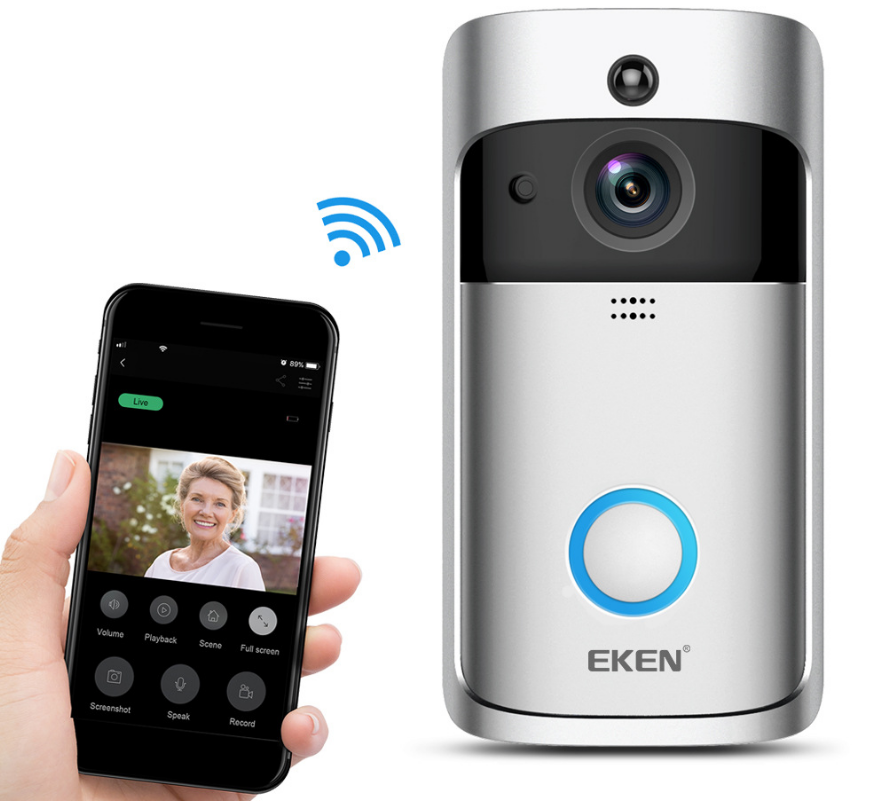
The WLD Store pick: Smart WiFi Video Doorbell Camera
WLD Store lists the Smart WiFi Video Doorbell Camera. Here is what the listing states, with nothing added:
- Product: Smart WiFi Video Doorbell Camera
- Category: Electronics
- Brand: WLD
- Function: see and speak to visitors from your phone over WiFi
- Available in: the USA, with secure checkout
- SKU: WLD-US-0019
The see-and-speak description covers the two features that matter most in daily use, since watching without being able to respond solves only half the problem. Current photographs and details are on the Smart WiFi Video Doorbell Camera product page.
WiFi: the detail that decides everything
More disappointment in this category traces back to WiFi than to any other cause, and almost all of it is predictable before you buy.
The first point is bands. Most smart doorbells connect only to the 2.4 GHz band rather than 5 GHz, because 2.4 GHz travels further and passes through walls better. If your router broadcasts both bands under a single name, setup can fail because the phone is on 5 GHz while the doorbell needs 2.4 GHz. Splitting the bands into separate network names temporarily during setup solves this reliably.
The second point is signal strength at the door, not in the hallway. Your front door is typically the furthest point in the house from the router, often through an external wall. Stand at the door with a phone and check the signal there. If it is weak, a video doorbell camera will drop out, notifications will arrive late, and live view will stutter.
The fix is usually a mesh node or extender positioned in the room nearest the door. It is far more effective than replacing the doorbell, and worth arranging before installation rather than after a fortnight of frustration.
Installation and mounting height
Getting the physical setup right takes half an hour and prevents most long-term annoyances.
- Mount at around 120 centimetres, roughly four feet, which frames an adult’s face rather than their chest and still captures the doorstep.
- Angle away from the street where possible, so the frame is filled with your own property rather than public pavement.
- Avoid direct sun on the lens, which washes out images and can cause repeated false triggers as shadows move.
- Use a wedge if the door is recessed, since an angled mount is often the difference between seeing a visitor and seeing a wall.
- Check for shelter. Most units tolerate weather, but a video doorbell camera under a porch will outlast one fully exposed to driving rain and direct sun.
If you are replacing a wired doorbell, turn off the circuit at the consumer unit before touching wiring, and if there is any doubt about the transformer or the condition of the cabling, have an electrician check it. This is a small job, but it is still mains-adjacent work.
Setting up motion zones and alerts
This is the step most people skip and the one that determines whether the device is a help or a nuisance. Straight out of the box, sensitivity is usually set high and covers the entire frame.
Start by excluding the street, the pavement and any neighbouring property from the detection area. Those regions generate constant movement that has nothing to do with your door. What remains should be your path, your doorstep and the approach to it.
Then tune sensitivity over about a week. Too high and you will get alerts for cats, foliage and passing headlights; too low and a genuine visitor may not trigger anything until they press the button. Adjust in small steps and give each setting a couple of days, because a video doorbell camera tuned properly is one you keep notifications switched on for.
Consider scheduling as well. Many people want alerts overnight but not during a busy weekday afternoon, and a schedule prevents notification fatigue far better than lowering sensitivity does.
Privacy and the rules worth knowing
Pointing a camera at the outside world carries responsibilities, and a little care avoids genuine problems with neighbours and the law.
Frame your own property. A video doorbell camera aimed primarily at your path and doorstep is uncontroversial; one framing a neighbour’s front window or garden is a dispute waiting to happen. Motion zones help, but the physical angle of the camera matters more.
Audio deserves particular attention in the United States, because recording laws vary considerably from state to state and some require the consent of all parties to a conversation. Rules on recording audio in public or semi-public spaces are not uniform, so check what applies where you live, and disable audio recording if you are unsure. Many people also fit a small sign indicating recording is in use, which is good practice regardless.
Finally, secure the account itself. A video doorbell camera is a camera pointed at your home, so use a strong unique password, enable two-factor authentication if offered, and keep the app and firmware updated. An unsecured camera account is a bigger privacy risk than anything the lens can see.
Common problems and quick fixes
Four issues account for the overwhelming majority of complaints, and most are environmental rather than faults.
- The device keeps going offline: nearly always weak WiFi at the door. Test the signal where the unit is mounted and add a mesh node or extender nearby.
- Notifications arrive late: usually network latency or aggressive battery optimisation on your phone. Allow the app to run in the background and check the connection quality first.
- Constant false alerts: motion zones too broad or sensitivity too high. Exclude the street and any moving foliage, then reduce sensitivity gradually.
- Battery drains quickly: cold weather and frequent triggers both take a heavy toll. Narrowing motion zones typically extends battery life more than anything else.
Living with it: what changes day to day
It is worth setting expectations, because the reality is less dramatic than marketing suggests and more useful than sceptics assume.
The most common daily use is deliveries. Being able to answer a courier while sitting at a desk, or check that a parcel was actually left where the notification said, removes a small friction that occurs several times a week. Over a year that is where most of the value sits.
The second most common use is simple reassurance: checking who rang while you were out, or looking at the door when a noise wakes you. A video doorbell camera answers those questions in seconds without anyone getting out of bed or opening a door to a stranger.
What it does not do is replace a security system. It watches one point of entry, it depends on your home internet, and it records what passes in front of it rather than preventing anything. Treated as one useful layer among several, a video doorbell camera is excellent value; treated as complete protection, it will disappoint.
Keeping it working through the seasons
A video doorbell camera lives outdoors permanently, which is a harder life than most household electronics ever face. A little seasonal attention prevents the slow decline that otherwise shows up as blurry images and missed triggers after a year or two.
The lens is the first thing to check. Rain spots, dust, pollen and spider webs all sit directly in front of the sensor, and a smeared lens degrades night vision far more than daytime images because infrared light scatters off the residue. Wipe it gently with a soft dry cloth every month or so, and avoid household cleaners, which can damage lens coatings.
Spiders deserve a specific mention because they are a genuine and widespread nuisance here. They are attracted to the warmth of the unit and to insects drawn by infrared light, and a web strung across the lens triggers motion alerts all night. Clearing webs regularly solves an alert problem that many people wrongly blame on sensitivity settings.
Cold weather affects a battery video doorbell camera most. Capacity drops as temperature falls, so a unit that lasted two months in autumn may need charging monthly in midwinter. Bringing it indoors to charge in a warm room, rather than charging it in a cold garage, both charges faster and treats the cell better.
Heat and sun matter at the other end of the year. Direct afternoon sun raises the internal temperature, can wash out the image, and ages the seals that keep water out. Where a porch or overhang is available, use it.
Who it suits, and who should look elsewhere
A video doorbell camera is a good fit for most homes with a front door on a path, particularly households that receive frequent deliveries or are often out during the day. If missed parcels are a recurring annoyance, this single device removes most of that friction.
It suits renters too, provided a battery model is chosen and the mounting method is reversible. Adhesive and bracket mounts avoid drilling entirely, though check the tenancy terms and be realistic about how well adhesive holds through a wet winter.
It is a poor fit in a few situations worth naming honestly. Homes with genuinely unreliable internet will find the experience frustrating, because every remote feature depends on that connection. Flats where the entrance is a shared communal door raise consent questions with neighbours and a building manager that are better resolved before installation than after. And anyone whose door opens directly onto a busy pavement should expect to spend real time tuning motion zones, since the camera will see the street whether you want it to or not.
Finally, if the goal is comprehensive security rather than convenience at the door, a doorbell alone is the wrong purchase. A video doorbell camera watches one entrance. Homes wanting broader coverage should plan a system rather than expecting one device to do the work of several.
Buying checklist
Five questions worth answering before ordering a video doorbell camera.
- Do I have existing doorbell wiring, or do I need a battery unit that mounts anywhere?
- Is my WiFi signal genuinely strong at the front door, not just in the hallway?
- Does my router offer a 2.4 GHz band the doorbell can join during setup?
- Can I define motion zones, so the street does not trigger constant alerts?
- Will the mounting position frame my own property rather than a neighbour’s?
Other WLD Store picks worth a look
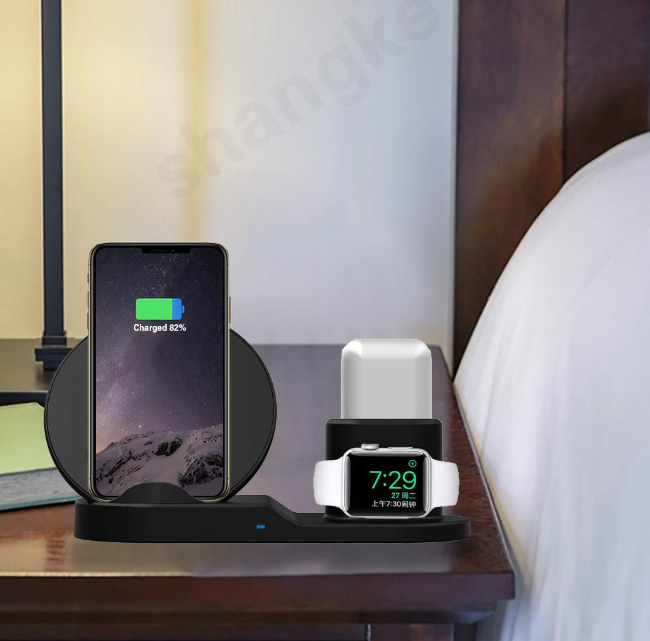
A few more electronics from the WLD Store range.


Frequently asked questions about the video doorbell camera
Do I need existing doorbell wiring?
Not necessarily. Wired models need it and reward you with continuous power, while battery models mount anywhere and need periodic charging. If you rent or have no wiring, a battery video doorbell camera is the straightforward answer.
Why will it not connect to my WiFi?
The usual cause is band mismatch. Most smart doorbells only join 2.4 GHz networks, and routers that broadcast both bands under one name can confuse setup. Temporarily separating the bands into different network names resolves this in most cases.
Does it work if the internet goes down?
Remote features stop, since live view and notifications depend on your connection. A wired unit will usually still ring the physical chime, but a video doorbell camera cannot alert your phone without internet, which is worth remembering if your connection is unreliable.
Can my neighbours object to it?
They can if it films their property, which is why framing matters. Angle it at your own path and doorstep, use motion zones to exclude anything beyond your boundary, and check local rules on audio recording, which vary by state in the USA.
How do I stop constant notifications?
Narrow the motion zones first, excluding the street and any moving plants, then reduce sensitivity in small steps over a week. Scheduling alerts for the hours you actually care about helps more than switching them off entirely.
Will it work in cold weather?
Generally yes, though battery models lose runtime noticeably in low temperatures because cold reduces the capacity of the cell. Mounting under a porch and narrowing motion zones both help a video doorbell camera get through winter with fewer recharges.
Installed at the right height, connected to WiFi that is genuinely strong at the door and tuned with sensible motion zones, a video doorbell camera is one of the most practical smart-home additions available, mostly because it solves the small daily problem of deliveries rather than a dramatic one. Frame your own property, secure the account properly, and check the audio rules where you live. You can view the Smart WiFi Video Doorbell Camera on the storefront, or browse more in the Electronics section.




Add comment